
To reduce Tron gas fees on USDT TRC-20 transfers, you can rent energy from a marketplace, stake TRX for free energy, or use TronLink’s “Gas-Free” option to pay fees in USDT. Each method lowers the cost of a transfer well below burning TRX directly.
This guide explains why Tron gas fees vary, compares the main tools and strategies, and shows practical ways to cut your USDT TRC-20 transfer costs. All prices and figures below are approximate as of 2026 and should be verified against a primary source before you act.
For a complete breakdown of every TRON fee and how to reduce your USDT transfer fees on each send, read our full guide to TRON network fees.
Key takeaways
- Two resources, not one: TRON transactions consume Bandwidth (simple transfers) and Energy (smart-contract calls like USDT). Energy is what makes USDT transfers expensive.
- Empty vs non-empty wallets matter: Sending USDT to a wallet that already holds USDT costs roughly half the energy of sending to a brand-new wallet.
- Rent or stake energy: Renting from a marketplace or staking TRX both avoid burning TRX at full price, often the biggest single saving.
- Gas-Free pays fees in USDT: TronLink’s Gas-Free feature lets you cover the fee in USDT, useful when you hold no TRX — but it is not zero-cost.
- Verify live numbers: TRX price, energy costs, and per-transfer fees change constantly — confirm them on TronScan before relying on any figure here.
What are Tron gas fees and why do they vary?
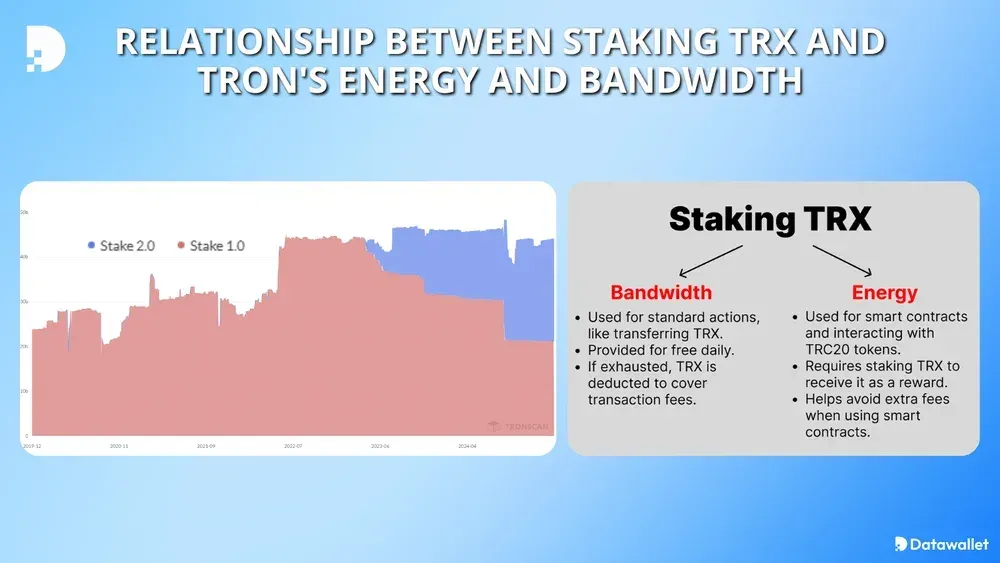
Unlike Ethereum’s single gas token, TRON splits transaction costs into two resources: Bandwidth and Energy. Understanding both is the first step to lowering your Tron gas fees.
- Bandwidth covers basic transactions such as sending TRX or TRC-10 tokens. Each account receives a free daily Bandwidth allowance (commonly cited as 600 points). When it runs out, a small amount of TRX is burned to cover the difference.
- Energy powers smart-contract execution, including USDT (TRC-20) transfers and dApp interactions. There is no free daily Energy — you either stake TRX to obtain it, rent it, or burn TRX to pay for it.
A USDT TRC-20 transfer typically consumes a large amount of Energy. Because the cost in TRX scales with the current Energy price and the TRX/USD rate, the same transfer can feel cheap one week and costly the next. This is why your fee “varies” even though the on-chain Energy requirement is fairly stable.
Why does sending to an empty wallet cost more?
When USDT is sent to a wallet that has never held USDT before, the contract must create a new storage entry, which consumes extra Energy. Sending to a wallet that already holds USDT skips that step and costs roughly half as much. Checking the recipient’s history on TronScan before a large transfer can meaningfully cut your Tron gas fees.
What tools reduce Tron gas fees?
Several tools and platforms help lower these TRC-20 transfer costs. None is a magic “free” button, so weigh the trade-offs honestly against your transfer volume.
| Method | How it saves | Best for | Trade-off |
| TronLink Gas-Free | Pays the fee in USDT instead of TRX | Users with no TRX balance | Not zero-cost; wallet-specific |
| Energy rental marketplaces | Buys pooled Energy below burn price | Casual to high-volume users | Need to choose a reputable platform |
| Staking TRX | Generates Energy for free | Long-term TRX holders | Funds locked; 14-day unstake window |
| Gas-fee calculators | Estimates cost before sending | Planning and timing transfers | Estimates only; verify live |
TronLink wallet (Gas-Free feature)
TronLink’s Gas-Free feature lets you pay TRC-20 fees in USDT, so you do not need TRX in your wallet. It is beginner-friendly: download TronLink, fund it with USDT, enable the USDT fee option in settings, and send. The fee is deducted in USDT rather than eliminated, so it remains a real cost — just a more convenient one when your TRX balance is empty.
Energy rental marketplaces
Energy rental platforms pool Energy from TRX stakers and resell it below the cost of burning TRX. Marketplaces such as the TronSave energy market and other providers let you rent Energy for a single transfer or in bulk. Renting can cut the Energy portion of a USDT transfer substantially compared with burning TRX at the network rate (savings vary with market conditions; verify current rates before relying on them). You can rent energy to reduce USDT fees as an alternative to staking if you do not want to lock up TRX.
Staking TRX for free Energy
Staking (freezing) TRX generates Energy at no per-transfer cost and can also earn voting rewards if you vote for a Super Representative. Under TRON Stake 2.0, unstaking starts a 14-day withdrawal window before funds are released. Staking suits long-term holders who transfer USDT regularly, but it ties up capital and exposes you to TRX price swings — review the mechanics in the official TRON developer documentation.
How can you slash Tron gas fees day to day?
Beyond tools, a few everyday habits keep your transfer costs low without any special software:
- Send to non-empty wallets: Confirm the recipient already holds USDT to roughly halve the Energy cost.
- Batch instead of splitting: A USDT transfer costs the same whether it moves 1 or 10,000 USDT, so combine small payments into one rather than splitting them.
- Use TRX for tiny transfers: Native TRX sends use Bandwidth (often free daily), so they are far cheaper than TRC-20 token transfers.
- Time transfers with TRX price: Because the fee is denominated in TRX, the USD cost rises and falls with the TRX rate — check TronScan or CoinMarketCap before moving large amounts.
- Estimate first: Use a calculator or the EstimateEnergy node call to preview the Energy a transaction will need.
What about developers and high-volume users?
Businesses handling many TRC-20 transactions can reduce Tron gas fees at scale with a few engineering choices:
- Bulk Energy rentals: Renting Energy in large blocks through a marketplace API is generally cheaper than burning TRX per transaction.
- EstimateEnergy API: Query a TRON node to predict the Energy a contract call needs (a simple USDT transfer needs roughly tens of thousands of Energy; complex dApps need more) so you can budget accurately.
- Optimize contracts: Reducing redundant storage writes and nested loops lowers Energy consumption per call.
- Sponsored fees: Fee-delegation patterns let an application cover Energy on behalf of users to improve onboarding — weigh the cost against the conversion benefit.
What are the risks of these savings methods?
Saving on transfer costs is not risk-free. Keep these caveats in mind:
- Staking risk: Frozen TRX is subject to a 14-day unstake window, and TRX price can fall while your funds are locked, potentially outweighing the fee savings.
- Platform risk: Not every Energy provider is trustworthy. Stick to platforms with a track record and verifiable contracts, and check independent reviews before sending funds.
- Tax treatment: Staking rewards and rental income are generally treated as ordinary income in many jurisdictions, including the US. Rules vary — consult a qualified tax professional.
- Stale figures: Fee levels, energy caps, and roadmap features change. Treat any specific number here as approximate and confirm it on a primary source.
Frequently asked questions about Tron gas fees
Why are my Tron gas fees so high for USDT?
USDT transfers are smart-contract calls that consume Energy, which has no free daily allowance. If you have not staked or rented Energy, TRON burns TRX to cover it, and the USD cost rises with the TRX price.
Is TronLink’s Gas-Free feature actually free?
No. Gas-Free lets you pay the fee in USDT instead of TRX, which is convenient when you hold no TRX, but a fee is still deducted. It removes the need for TRX, not the cost itself.
Is renting energy or staking TRX better?
Renting suits occasional or variable users who do not want to lock capital. Staking suits long-term holders who transfer often and accept a 14-day unstake window and TRX price exposure. Compare both against your transfer frequency.
How much can I save by sending to a non-empty wallet?
Sending USDT to a wallet that already holds USDT typically costs about half the Energy of sending to a fresh wallet, because no new storage entry is created. Verify the recipient’s history on TronScan first.
Does a Tron gas fee calculator give exact costs?
Calculators provide estimates based on current Energy prices and the TRX rate. They are useful for planning, but live network conditions can differ, so confirm the final cost in your wallet before sending.
Will Tron gas fees keep falling?
TRON has expanded Energy capacity and stablecoin-fee options over time, which can ease costs, but future fee levels depend on network demand and governance decisions. Track announcements on official TRON channels rather than relying on projections.
⚠️ Not financial advice. This article is for educational and informational purposes only and reflects the author’s opinion at the time of writing. It is not investment, financial, legal, or tax advice. Cryptocurrency is highly volatile and you can lose your entire principal; prices, APYs, and on-chain fees change constantly and may be out of date. Always do your own research (DYOR) and consult a licensed financial advisor before buying, selling, staking, or lending any digital asset.
Disclosure: This is the official TronSave blog. TronSave sells TRON energy/resource (fee-reduction) services and has a commercial interest in the products and topics covered here.



