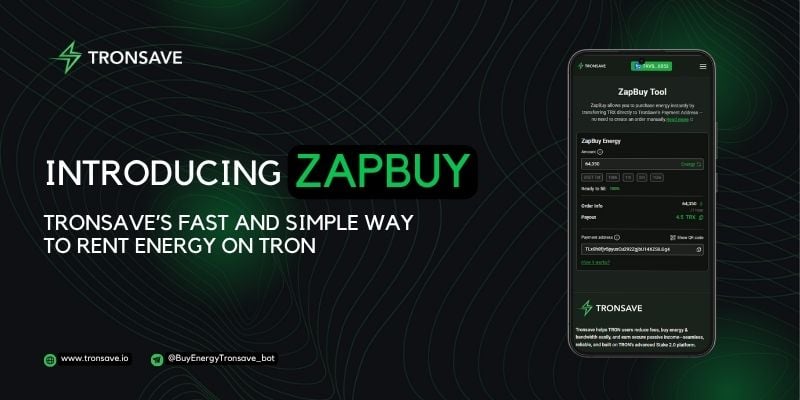
Updated June 2026. ZapBuy is a Tronsave feature that lets you rent Energy on TRON simply by sending TRX to a bot address. The system reads the amount received and automatically creates a 1-hour Energy rental for your wallet, with no DApp connection or registration required.
Key Takeaways
- ZapBuy lets you rent Energy on TRON by sending TRX to Tronsave’s bot address, which auto-creates a 1-hour rental order.
- It is designed for quick needs such as USDT (TRC-20) transfers and smart-contract calls, where Energy offsets the resource a transaction would otherwise burn.
- The minimum is roughly 4.55 TRX for about 65,000 Energy; transactions below the minimum are ignored, and flexible amounts above it are supported.
- Always verify the recipient address on TronScan before sending. On-chain transfers are irreversible, so a wrong address means lost funds.
- Renting Energy is one option for cutting fees; staking TRX yourself or using other Energy marketplaces are valid alternatives worth comparing.
What is ZapBuy and how does it rent Energy on TRON?
ZapBuy is a “send-to-buy” tool from Tronsave, an Energy and bandwidth marketplace on the TRON network. Instead of opening a DApp, connecting a wallet, and confirming several prompts, you simply transfer TRX to a fixed bot address. ZapBuy detects the payment and turns it into a 1-hour Energy rental delivered straight to the wallet you sent from.
Energy is the resource TRON consumes when you trigger smart contracts, including TRC-20 token transfers like USDT. If your account lacks Energy, the network burns TRX to cover the cost, which makes transfers more expensive. Renting Energy can lower that cost. For background on how the network meters these resources, see the official TRON resource model documentation.
How do you rent Energy on TRON with ZapBuy?
The flow is intentionally short. There is no login and no on-chain approval beyond the single TRX transfer you initiate yourself.
- Calculate the TRX needed: Use the ZapBuy Energy calculator to estimate how much TRX a given Energy amount requires. As of 2026 the published examples are about 4.55 TRX for 65,000 Energy and 9.1 TRX for 130,000 Energy; verify live rates before sending, as pricing fluctuates.
- Verify the address: Confirm the bot address on TronScan and double-check every character matches before you move funds.
- Send TRX: Transfer at least the minimum (about 4.55 TRX) from a personal wallet such as TronLink. Amounts below the minimum are ignored.
- Automatic order creation: ZapBuy reads the received TRX and generates a 1-hour rental order.
- Energy delegation: If the order matches available Energy, it is delegated to your wallet. If no match is found, you can request a refund through the verified official @tronsaveofficial channel.
Because the request comes from your transfer, ZapBuy must receive funds from a personal wallet you control, not an exchange withdrawal or a smart-contract address.
What are the technical details?
| Parameter | Value |
|---|---|
| Supported token | TRX only |
| Recipient (bot) address | TLx8h8fjv5pyuxCu292ZgjbU14XZSiLGg4 |
| Energy recipient | The wallet that sent the TRX |
| Rental duration | 1 hour (fixed) |
| Minimum Energy | ~65,000 |
| Minimum TRX | ~4.55 TRX (verify live) |
| Order creation | Automatic on TRX receipt |
Who is ZapBuy for, and how does it compare to other options?
ZapBuy fits people who want occasional, on-demand Energy without managing a DApp session. It is not the only way to handle TRON resources, so it helps to see where it sits among the alternatives.
- Individual users: Anyone needing temporary Energy for a USDT transfer without locking up TRX long term.
- Developers and small businesses: Teams that call smart contracts and want quick, ad-hoc Energy.
- Simplicity seekers: Users who prefer a single transfer over multi-step DApp navigation.
| Approach | How it works | Best for |
|---|---|---|
| ZapBuy (send-to-buy) | Send TRX to a bot address; 1-hour rental auto-created | Quick, one-off Energy with no DApp |
| Tronsave dashboard | Manual or auto buy through the app, with order history | Frequent buyers who want controls |
| Staking TRX yourself | Freeze TRX to generate your own Energy/bandwidth | Long-term, predictable usage |
| Other Energy marketplaces | Competing rental platforms and bots | Comparing price and reliability |
If you transact often, learn how staking TRX provides Energy or bandwidth so you can weigh renting against running your own resources. For one-off transfers, our guide to getting TRON Energy fast and saving on fees covers the trade-offs in more detail.
Is ZapBuy safe to use? Key precautions
ZapBuy is convenient, but moving real funds always carries responsibility. Treat these as non-negotiable before you send anything.
- Irreversible transfers: TRON transactions cannot be reversed. A mistyped address means permanently lost TRX.
- Verify on-chain: Cross-check the bot address on TronScan, not just a screenshot or chat message.
- Use a personal wallet: Send only from a wallet you control; exchange or contract sources will not work and may strand funds.
- Use official channels: For refunds or support, only use the verified @tronsaveofficial channel to avoid impersonators.
Frequently Asked Questions
What is the minimum amount to rent Energy on TRON with ZapBuy?
The published minimum is roughly 4.55 TRX for about 65,000 Energy as of 2026. Verify the current rate in the ZapBuy calculator first, because pricing changes with market conditions. Transfers below the minimum are ignored.
How long does the Energy last?
Each ZapBuy order is a fixed 1-hour rental. Once delegated, the Energy is available to your wallet for that window, after which the delegation ends. Plan your transactions to fall within the hour.
What does “no match found” mean?
It means ZapBuy could not pair your order with available Energy at that moment. In that case the system does not deliver Energy, and you can request a refund through the official @tronsaveofficial channel.
What happens if I overpay?
Sending more TRX generally requests more Energy, up to what is available. If the exact handling is unclear for your amount, confirm with official support before sending a large transfer, and start with a small test transaction.
Can I use ZapBuy from an exchange wallet?
No. ZapBuy needs the Energy recipient to be the sending wallet, so funds must come from a personal wallet like TronLink rather than an exchange withdrawal or a smart contract.
Is renting cheaper than staking?
It depends on how often you transact. Occasional users often save with rentals, while heavy, steady users may prefer staking their own TRX. Compare both and consider why renting TRON Energy can reduce USDT fees for your situation.
⚠️ Not financial advice. This article is for educational and informational purposes only and reflects the author’s opinion at the time of writing. It is not investment, financial, legal, or tax advice. Cryptocurrency is highly volatile and you can lose your entire principal; prices, APYs, and on-chain fees change constantly and may be out of date. Always do your own research (DYOR) and consult a licensed financial advisor before buying, selling, staking, or lending any digital asset.
Disclosure: This is the official TronSave blog. TronSave sells TRON energy/resource (fee-reduction) services and has a commercial interest in the products and topics covered here.