
How to rent TRON energy in 2026, in one sentence: open the TronSave energy market, connect your TRON wallet, enter how much energy you need and for how long, confirm the payment, and a smart contract delegates the energy to your address within seconds. Your next USDT (TRC-20) transfer then burns little to no TRX.
This guide is a pure hands-on tutorial. You will find the exact steps for renting on the website, plus two alternatives — the TronSave Telegram bot and the developer API — and a short section on sizing the rental correctly so you do not overpay.
👉 Try it free: use the USDT Fee Savings Calculator to see exactly how much you’d save by renting TRON energy instead of burning TRX.
What you need before you start
- A TRON wallet you control — TronLink, Trust Wallet, or any wallet that can connect to a dApp or copy out your public address.
- A little TRX in that wallet to pay for the rental (renting typically costs less than the TRX the network would otherwise burn).
- A rough energy estimate. A USDT transfer to a wallet that already holds USDT needs about 64,000–65,000 energy; a transfer to an empty wallet needs about 130,000. These figures are higher than the contract’s base cost because TRON applies a dynamic energy penalty to heavily used contracts like USDT (it varies each maintenance cycle). Details in our guide to how much energy a USDT transfer needs.
Renting is non-custodial and needs no signup: the marketplace only ever sees your public address. No legitimate energy rental ever asks for your seed phrase or private key — if one does, close the tab.
How to rent TRON energy step by step (website)
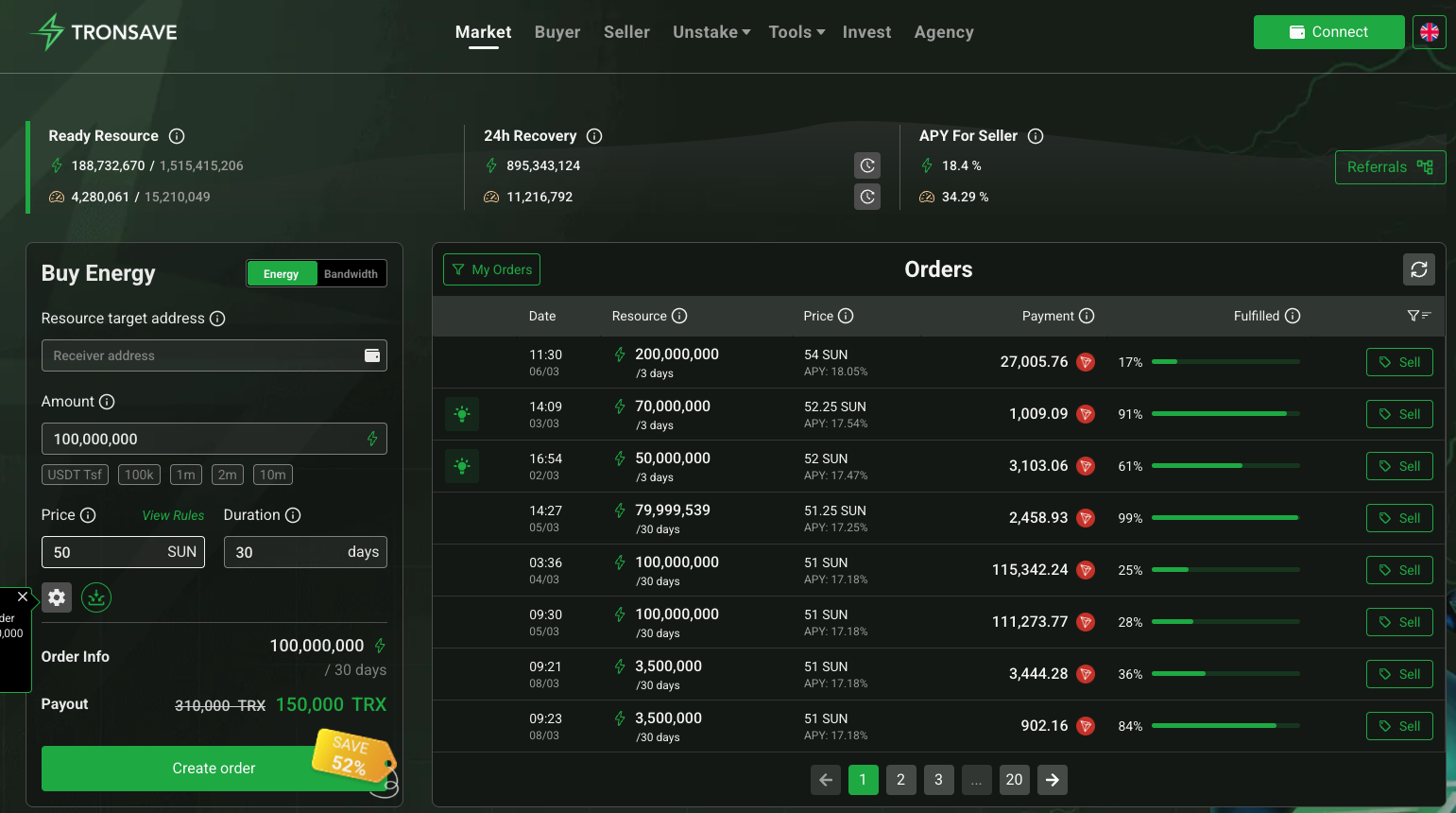
Step 1: Open the market and connect your wallet
- Go to tronsave.io/market. Type the URL yourself or use a saved bookmark to avoid look-alike phishing sites.
- Click Connect Wallet and choose TronLink (or another supported wallet). Approve the connection — it shares only your public address, not signing power over your funds.
Step 2: Set the receiver and the energy amount
- The receiver defaults to your connected address. You can also paste any other address — for example, to top up a second wallet or a friend’s.
- Enter the energy amount, e.g. about 65,000 for a standard USDT send or about 130,000 if the recipient wallet is brand new.
Step 3: Choose the duration and order type
- Pick how long you want the energy delegated — from about an hour for a one-off transfer up to 30 days for ongoing use. Longer durations usually cost less per day.
- Leave the default SmartOrder selected if you just want the market to fill your order at the best available price. Power users can set a manual price against the live order book — see TronSave order types explained.
Step 4: Review the quote and pay
- Check the summary: energy amount, duration, and total TRX cost.
- Click Buy and confirm the transaction in your wallet.
Step 5: Receive the delegation and send your USDT
- Within seconds the energy is delegated to the receiver address. You can verify the new energy balance in your wallet or on any TRON block explorer.
- Send your USDT as normal — the rented energy is consumed instead of burning TRX.
- When the rental period ends, the delegation is reclaimed automatically. Nothing to cancel, nothing to return.
Pro tip: if a delegation is about to expire while you still need it, TronSave’s ExtendOrder feature lets you extend or top up the same delegation instead of placing a fresh order.
Alternative 1: rent energy in Telegram
If you live in Telegram, you never have to open the website:
- Open the official TronSave Telegram bot (linked from the tronsave.io homepage — avoid bots found via search).
- Tap Buy Energy, paste the receiver address, and choose the amount and duration.
- Pay from the bot’s built-in balance or your linked wallet and the delegation lands in seconds.
The bot is handy for repeat top-ups on the go, and it supports the same order types as the website.
Alternative 2: rent energy via the API (developers)
Exchanges, payment processors, and power users can automate the whole flow. The TronSave API docs cover authentication, price estimation, and order creation, and there are ready-made SDKs — see our TronSave SDK guide (Node.js, Python and more). A typical integration estimates the energy needed, places an order for the receiver address, then broadcasts the USDT transfer once the delegation confirms.
How much should you rent, and for how long?
Comparing providers first? See the best TRON energy rental in 2026 for a ranked breakdown.
- One-off transfer: rent just what the transfer needs (about 65k or 130k energy) for the shortest duration. Cheapest possible send.
- Daily activity: rent a day or more of a larger amount — the per-transfer cost drops with longer durations.
- Never want to think about it: turn on Auto-Buy, which watches your wallet and tops up energy automatically whenever you run low.
Prices move with the live order book, so treat every number here as approximate and check the quote on the market page before you pay.
FAQ: renting TRON energy
How long does it take to rent TRON energy?
About a minute end to end. The delegation itself usually arrives within seconds of your payment confirming.
Is renting TRON energy safe?
Yes, when it is non-custodial: energy is delegated to your address by smart contract, and only your public address is ever needed. Never share a seed phrase or private key, and always double-check the site URL before connecting.
Can I rent energy for a wallet that isn’t mine?
Yes. Set any TRON address as the receiver in Step 2 — useful for topping up a second wallet, a team member, or a customer.
What happens when the rental expires?
The delegation is reclaimed automatically at the end of the period. If you still need energy, extend it with ExtendOrder or let Auto-Buy re-order for you.
Do I need TRX to rent energy?
You need a small amount of TRX to pay for the rental itself. That is typically less than the TRX the network would burn on a transfer with no energy — at recent rates, about 4.4 TRX rented vs about 6.4 TRX burned for a funded-recipient transfer. Run your own numbers in the fee savings calculator.
⚠️ Not financial advice. This article is for educational and informational purposes only and reflects the author’s opinion at the time of writing. It is not investment, financial, legal, or tax advice. Cryptocurrency is highly volatile and you can lose your entire principal; prices, APYs, and on-chain fees change constantly and may be out of date. Always do your own research (DYOR) and consult a licensed financial advisor before buying, selling, staking, or lending any digital asset.
Disclosure: This is the official TronSave blog. TronSave sells TRON energy/resource (fee-reduction) services and has a commercial interest in the products and topics covered here.
Related guides: All the ways to get TRON energy · Cheap TRON energy: the real fee math · Rent on the TRON energy market



