Sending USDT on TRON without energy burns TRX, and the price of that burn changes with the network. Renting energy first is cheaper, but it is one more chore: check the price, place the order, wait for the delegation. If you already work in an AI assistant all day, that chore can now be a sentence.
TronSave runs an official MCP server at https://mcp.tronsave.io. MCP (Model Context Protocol) is the open standard that lets assistants like Claude, Cursor and VS Code use outside tools. Connect TronSave once, and you can ask your assistant for a quote, buy energy, check your orders or set up auto-buy. You approve every purchase before it happens.
You don’t have to wait for a marketplace listing either. It takes about two minutes. This guide covers setup step by step; for what each of the 53 tools does, see TronSave MCP Server: Let an AI Agent Buy TRON Energy.
What you can ask
- “What’s the cheapest energy on TronSave right now?”
- “How much energy does my wallet need for a USDT transfer, and what would it cost?”
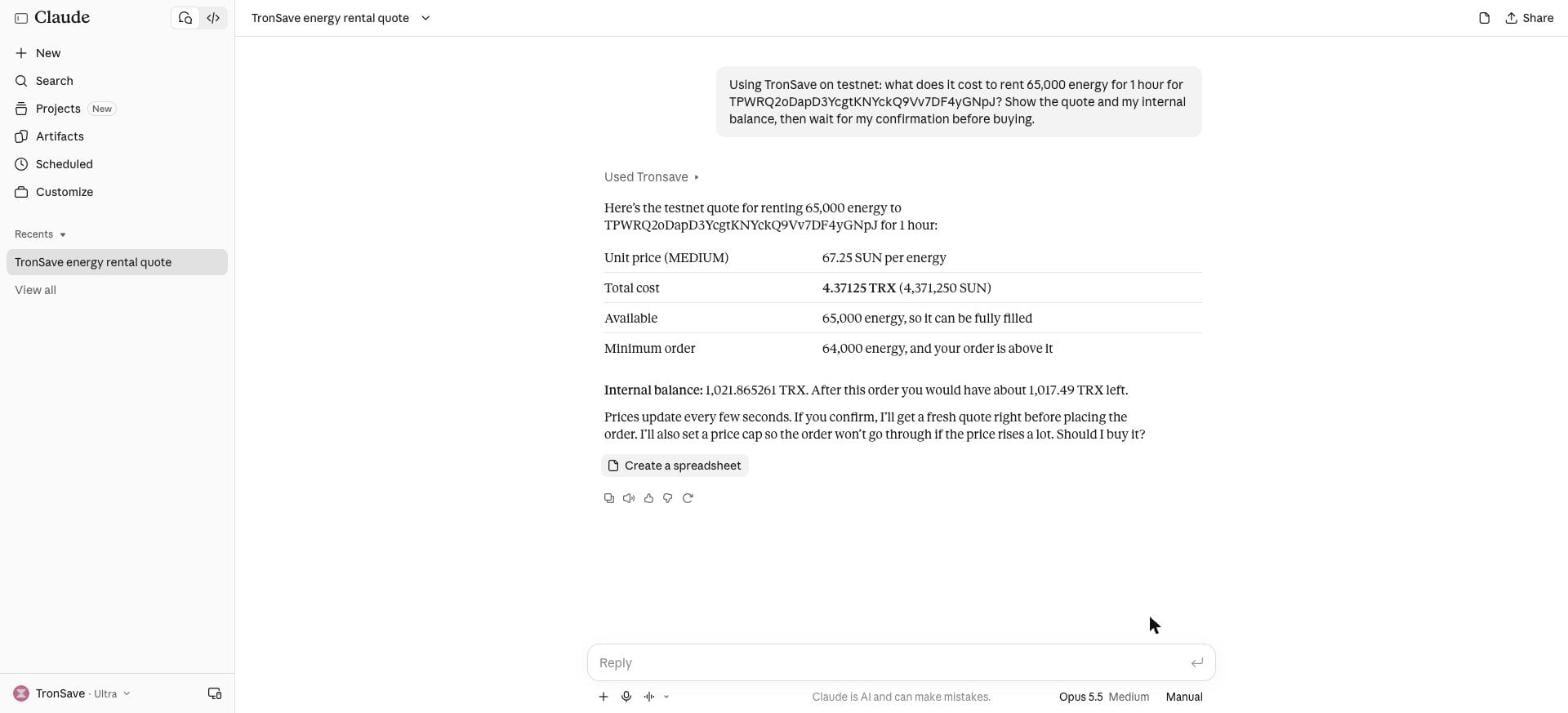
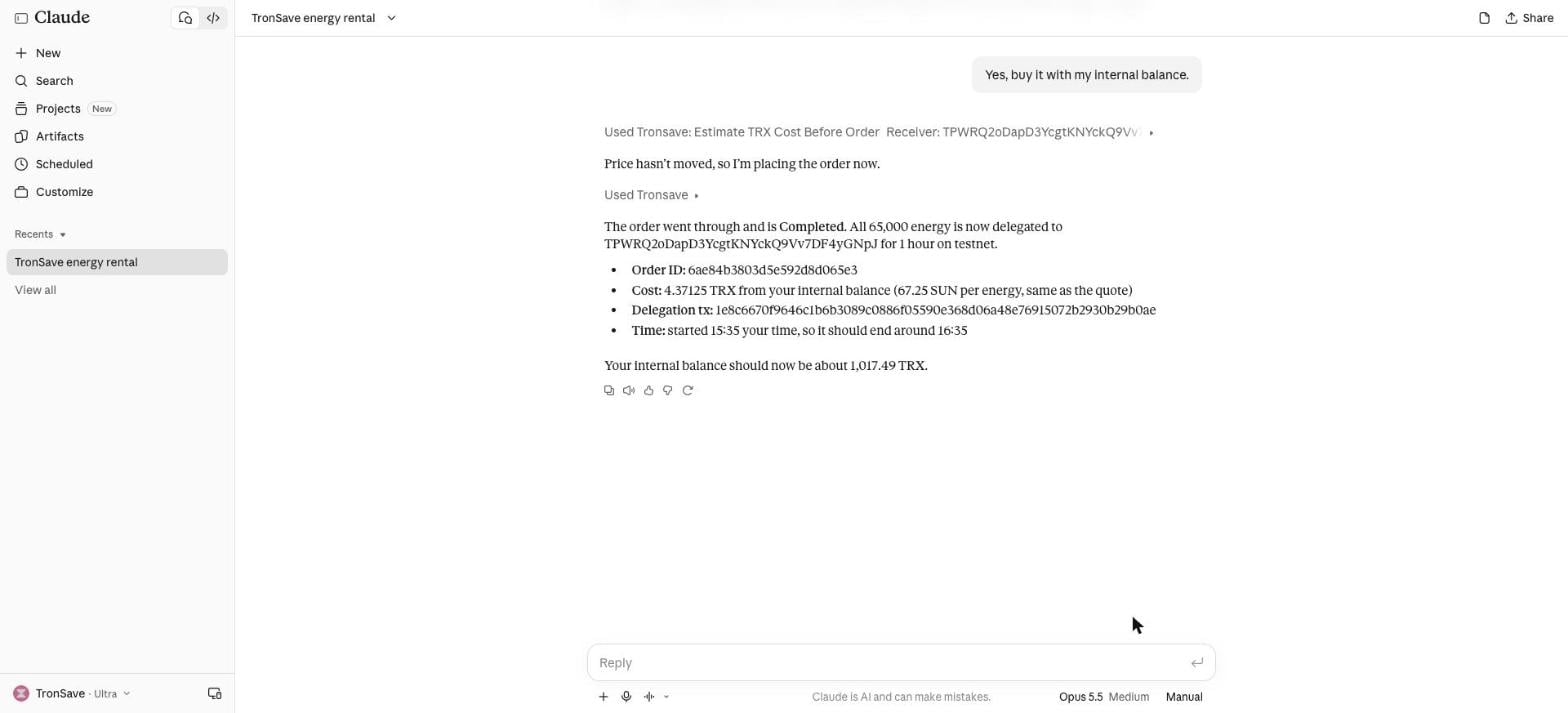
- “Buy 65,000 energy for one hour for my wallet with my TronSave balance.”
- “Show my open orders and cancel the oldest one.”
- “Keep my wallet above 100k energy with auto-buy, budget 50 TRX.”
Behind those sentences are 53 tools: live order book and price table, quotes for any address, orders paid from your TronSave balance or from a transaction your own wallet signs, order management, auto-buy and auto-sell rules, notifications and account tools.
Pick the right URL
| URL | When to use it |
|---|---|
https://mcp.tronsave.io/oauth/mcp |
Recommended. Your assistant opens a TronSave sign-in page; sign in with your API key or TronLink. |
https://mcp.tronsave.io/mcp |
Prices and quotes only, no sign-in. |
https://mcp.tronsave.io/oauth/testnet/mcp |
Practise on the Nile testnet with test TRX. |
Claude Code
Add TronSave once for all your projects:
claude mcp add --transport http --scope user tronsave https://mcp.tronsave.io/oauth/mcpThen start Claude Code, type /mcp, pick tronsave and choose Authenticate. Your browser opens the TronSave sign-in page; when it confirms, you’re done. Try: “Use TronSave to show the current price of energy.”
This is handy while you deploy or test TRC-20 contracts: ask for energy for the deployer address right where you work.
Cursor
Add this to ~/.cursor/mcp.json:
{
  "mcpServers": {
    "tronsave": { "url": "https://mcp.tronsave.io/oauth/mcp" }
  }
}
Open Cursor Settings → MCP, find tronsave and sign in. Then ask in the Agent chat. A TronSave plugin is also on its way to the Cursor Marketplace.
Claude on the web and desktop
Go to Settings → Connectors → Add custom connector, name it TronSave, paste https://mcp.tronsave.io/oauth/mcp, then Add and Connect. (Custom connectors depend on your Claude plan.)
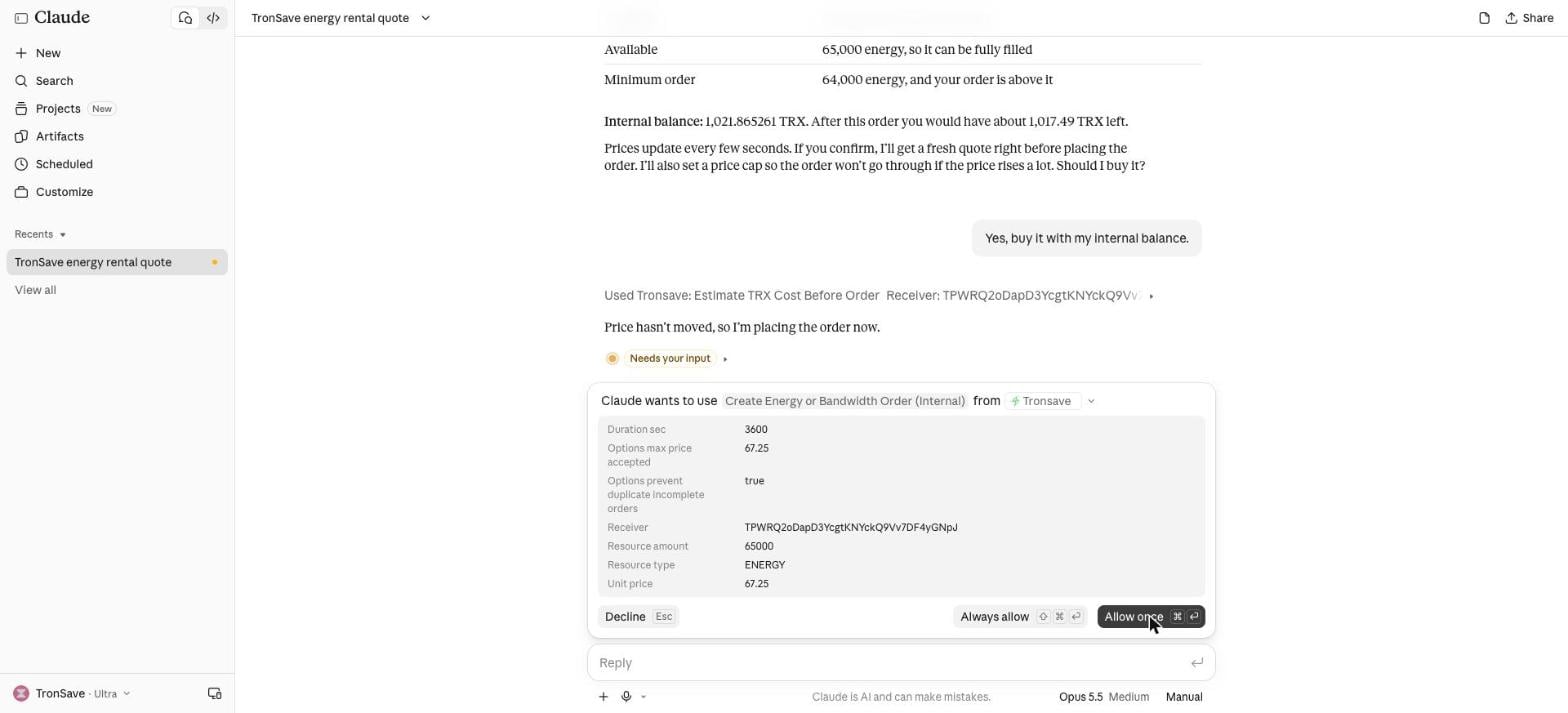
When Claude wants to place an order, it shows you exactly what it is about to do: receiver, amount, duration, unit price and the maximum price it will accept. Nothing is bought until you click Allow.
Signing in: API key or wallet
The sign-in page offers two ways in:
- TronSave API key gives your assistant access to your internal balance: buy from it, see order history and your deposit address. The sign-in lasts 30 days.
- TronLink wallet gives access to your wallet account: orders, auto-buy and auto-sell, notifications. You sign a short timestamp message, and the sign-in lasts 24 hours.
Quotes and market data need no sign-in at all.
Is it safe?
- Your private key never leaves your wallet. TronSave only ever receives a signature you approve. Never paste a private key or seed phrase into any AI chat.
- Every purchase needs your approval. Tools that spend funds or change settings are marked as writes, so Claude, Cursor and other apps ask first.
- Built-in guard rails. Orders carry a price cap and duplicate protection, and a failed purchase is never retried automatically.
- Try it on testnet first. Use the testnet URL with a Nile wallet and free test TRX.
For what TronSave can and cannot touch in your wallet, see Is TronSave Safe?
FAQ
Do I need a TronSave account?
Not for prices and quotes. To buy from your balance or manage orders, sign in with a TronSave API key or your TronLink wallet on the sign-in page your assistant opens.
Can the assistant spend my TRX without asking?
No. Buying and changing settings are marked as write actions, so Claude, Cursor and other apps ask you first. With an API key, the assistant can only spend what is in your TronSave internal balance.
Is TronSave already in the Claude or Cursor marketplace?
Not yet; listings are under review. Until then, add it yourself with the URL above. It is the same server either way.
Does it work in other apps?
Yes. Any app that supports remote MCP servers over HTTP works with the same URL, including VS Code, Windsurf and the Anthropic and OpenAI APIs.
Why did my wallet sign-in stop working after a day?
A wallet sign-in is valid for 24 hours. Sign in again from your app’s MCP or connector settings.
Can I try it without real TRX?
Yes. Connect to https://mcp.tronsave.io/oauth/testnet/mcp with a Nile testnet wallet.
Get started
- Step-by-step setup and troubleshooting: mcp.tronsave.io/connect
- Prefer clicking? Buy energy directly on the TronSave market.
- Docs: Use TronSave with AI Assistants · MCP Server reference
- Source code (MIT): github.com/tronsave/tronsave-mcp
Questions? Reach us at admin@tronsave.io or on Telegram.