The Extend feature on TronSave lets you top up TRON Energy and add more days to an active rental from the same delegate address, so resources are not reclaimed the moment your timer runs out. It is built to extend duration and buy more Energy in one transaction.
What Is the Extend Feature on TronSave?
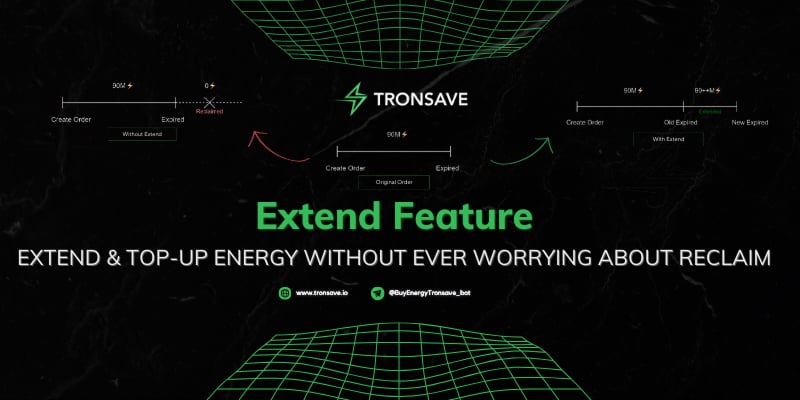
When you rent Energy and Bandwidth on TRON, most rental platforms follow a simple rule: buy once, use once, and when the timer hits zero the delegated resources are reclaimed. If you need more Energy, you create a brand-new order from a new delegate.
This tool changes that workflow. Instead of starting over, you can extend the duration of an existing delegation and add more Energy from the exact same delegate address. This reduces the chance of an unexpected reclaim and keeps your dApps, swaps, and USDT transfers running without interruption. Energy delegation on TRON is governed by the network’s Stake 2.0 model, which you can review in the official TRON resource model documentation.
Key Takeaways
- Top up anytime: The Extend feature adds more Energy and more days to a live rental without creating a new order.
- Same delegate: You can buy additional Energy from the same delegate address repeatedly.
- One transaction: Extend duration and buy more Energy together, then sign once.
- Two modes: Quick Extend for beginners and Advance Extend for per-delegate control.
- Verify on-chain: Confirm any delegation or reclaim behavior yourself on TronScan before relying on it.
Why Does the Extend Feature Matter for TRON Users?
On TRON, Energy is the resource that pays for smart-contract execution, such as moving USDT (a TRC-20 token). Renting Energy is usually cheaper than burning TRX or staking large amounts yourself. The trade-off with most rentals is the fixed expiry: when time runs out, the resource is gone.
Extend reduces that friction. The table below compares a typical “buy once” rental flow with how Extend is designed to work. As always, behavior varies with network conditions, so treat the comparison as a feature overview rather than a guarantee.
| Typical “buy once” rental | TronSave Extend feature |
| Resources reclaimed at expiry | Designed to extend the active delegation before reclaim (verify on-chain) |
| One purchase per delegate address | Buy additional Energy from the same delegate repeatedly |
| No way to extend an existing order | Extend duration and add Energy on a live order |
| Must create a new order to increase Energy | Extend and buy more in a single transaction |
For example, a 100k Energy delegation expiring in 3 days can be extended to roughly 200k Energy with a longer lifetime in one click. This is one approach to resource management; staking your own TRX for Energy or using other rental marketplaces are valid alternatives depending on how frequently you transact.
How Do You Use the Extend Feature on TronSave?
There are two ways to use the Extend feature: Quick Extend for a fast top-up and Advance Extend for fine-grained control over each delegate.
Quick Extend in 4 Steps
- Open the Extend tab. Connect your wallet, scroll to the Extend section, and select the target address you want to extend resources for.
- Choose “Quick extend.” This is the simplest mode for most users.
- Fill in the conditions. Four fields control the action (see list below).
- Confirm and pay. Review the summary, click “Extend,” and sign the transaction for the exact TRX amount shown.
The four Quick Extend fields are:
- Max price – the highest price you are willing to pay to extend or buy more.
- Extend duration – how many days to add (new expiration = now + chosen days).
- Additional amount – extra Energy you want (enter 0 to only extend time).
- Extend amount – total Energy to extend, usually auto-filled with the current amount.
Worked example: a delegate gave you 100k Energy expiring in 3 days. You set Extend duration to 5 days and Additional Amount to 100k. The result is 200k Energy with a 5-day lifetime counted from now. The interface shows the total extended Energy and estimated cost before you sign.

Advance Extend for Power Users
Advance Extend gives you control over every delegate currently renting resources to your target address. After opening the Extend tab and selecting your address, switch to “Advance” mode. For each delegate you can choose:
- Extend only – increase duration (1–30 days, must be longer than the remaining time).
- Buy more only – add Energy (minimum 100k, up to the delegate’s remaining capacity).
- Extend and buy – do both at once.
Handy shortcuts let you apply the same settings, the same “extend only” action, or the same duration to every selected delegate. A real-time cost preview appears on the right for each choice, and the final step is the same confirm-and-pay flow as Quick Extend.
How Does the Extend Feature Compare to Other Options?
This option is most useful if you transact often and want to keep a stable pool of Energy on one address. If your usage is occasional, a single short rental or self-staking may be simpler and cheaper. To estimate costs before you commit, the TRON Energy and Bandwidth calculator guide walks through how Energy pricing is calculated. Pricing for energy and bandwidth varies with network demand, so always check the live quote in the app.
Frequently Asked Questions
What is the Extend feature on TronSave?
It is a tool that lets you add more days and more Energy to an existing TRON rental from the same delegate address, designed to avoid an immediate reclaim at expiry. Verify the on-chain result on TronScan.
Can I buy more Energy from the same delegate twice?
Yes. The Extend feature is designed to let you purchase additional Energy from the same delegate address multiple times instead of opening a new order each time.
What is the difference between Quick Extend and Advance Extend?
Quick Extend applies one simple set of conditions in four fields, ideal for beginners. Advance Extend lets you configure each delegate individually, which suits power users managing many delegations.
How long can I extend a rental?
In Advance mode you can set a duration of 1–30 days, and it must be longer than the remaining time on that delegation. Confirm the exact range in the live app, as product limits can change.
Does extending cost extra TRX?
Yes. You pay for the added Energy and the extended duration, and you sign for the exact TRX amount shown in the summary. Prices vary with network conditions, so review the live quote before confirming.
How do I verify a delegation or top-up happened?
Open your address on TronScan and check the energy/resource and transaction tabs. On-chain records let you independently confirm the extend or top-up transaction.
Last updated: June 2026. The Extend feature is a TronSave product; energy and bandwidth pricing varies with network conditions. Verify duration ranges, fields, and on-chain behavior against the live app and TronScan before relying on them.