
To TRON delegate resources means sharing the Energy or Bandwidth your staked TRX produces with another address, while you keep full ownership of the underlying TRX. Using Stake 2.0 on TRONSCAN or a wallet like TronLink, you delegate in under two minutes and recall the resources later.
Key Takeaways
- When you TRON delegate resources, only the Energy or Bandwidth is lent out, never the TRX itself.
- Delegation runs on TRON’s Stake 2.0 model and works on TRONSCAN, TronLink, and Klever.
- Delegation can be unlocked (recall anytime) or locked (3–30 days), and only locked delegation supports rental income.
- Two waiting periods are easy to confuse: a locked delegation’s 3–30 day term, and Stake 2.0’s separate 14-day unstaking withdrawal period.
- Earning from delegation through platforms like TronSave is possible, but APY is variable and not guaranteed.
What Are TRON Resources and Why Delegate Them?
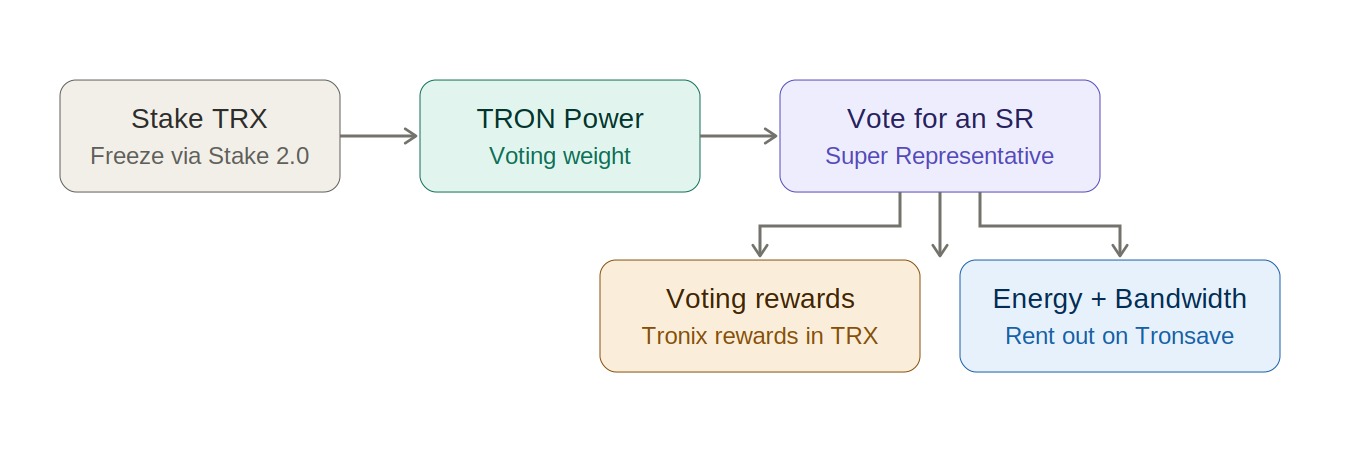
The TRON network runs on two resources that power on-chain activity:
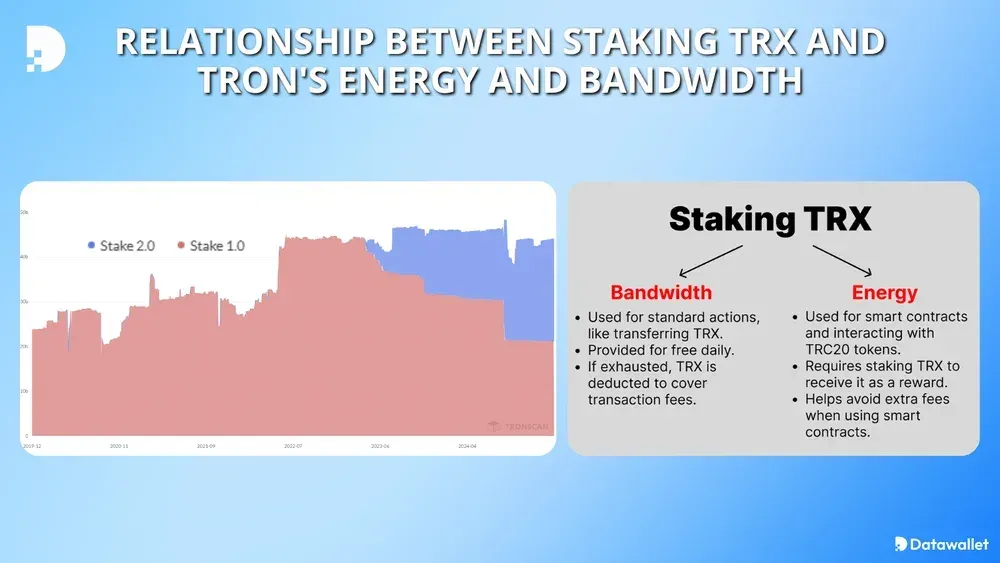
- Bandwidth – consumed by ordinary TRX transfers; every account gets a small free daily allowance (around 600 points).
- Energy – required for every USDT TRC-20 transfer and smart-contract interaction.
Staking (freezing) TRX under Stake 2.0 generates these resources. Rather than letting idle Energy sit unused, you can TRON delegate resources to another address. The receiver can immediately spend the delegated Energy or Bandwidth, while your staked TRX remains frozen in your own wallet. For background, see our explainer on TRON Energy and Bandwidth.
How Do You TRON Delegate Resources on TRONSCAN?
The official explorer at tronscan.org is the most common way to delegate. The steps below reflect the Stake 2.0 interface; always verify against the official TRON resource model documentation.
- Open tronscan.org and connect your wallet.
- Click your address, open the Resources panel, and enter Stake 2.0.
- Under My Resources, choose Energy or Bandwidth, then select Delegate to others.
- Paste the receiver address and the amount of TRX whose resources you want to delegate.
- (Optional) Enable Lock and set a period between 3 and 30 days; locking is required if you intend to earn rental income.
- Confirm and sign the transaction.
Once the transaction confirms on-chain, the resources appear in the receiver’s account instantly. No action is needed on their side.
Locked vs Unlocked: Which Delegation Should You Use?
Before you TRON delegate resources, decide whether you need to recall them on demand or commit them for a fixed term. The table below compares both modes.
| Feature | Unlocked | Locked |
| Can undelegate anytime | Yes | No – must wait the full term |
| Minimum lock | N/A | 3 days |
| Maximum lock | N/A | 30 days |
| Best for | Helping friends cover fees | Rental platforms (e.g., TronSave, staking marketplaces) |
| Income potential | None | Variable; advertised up to ~18% APY (not guaranteed) |
Unlocked delegation suits anyone who just wants to spare a friend the cost of USDT fees. Locked delegation is the foundation of resource-rental markets, where providers commit Energy for a fixed period in exchange for payment.
How Do You Undelegate Resources?
- Unlocked delegation – recall it instantly from the “Delegated to others” tab on TRONSCAN.
- Locked delegation – you must wait until the lock countdown (visible on TRONSCAN) finishes before you can reclaim the resources.
This is where the two TRON waiting periods are easy to mix up:
- The locked-delegation period (3–30 days) controls when delegated resources can be recalled.
- The Stake 2.0 unstaking period is a separate, fixed 14-day waiting window before unstaked (unfrozen) TRX returns to your spendable balance. See the TRON developer docs to confirm both.
Can You TRON Delegate Resources From a Mobile Wallet?
Yes. Major wallets support native delegation, so you do not need a desktop browser:
- TronLink and Klever – open Portfolio, select TRX, choose Freeze/Stake, then Delegate, fill in the receiver and amount, and confirm.
- The same lock options (3–30 days) are available in-app.
Mobile delegation is functionally identical to TRONSCAN; it simply wraps the same Stake 2.0 transaction in a friendlier interface.
What Does It Cost to Delegate? (As of 2026)
The figures below are indicative and change with network conditions; treat them as approximate and verify against a primary source before relying on them.
| Item | Detail (approximate, as of 2026) |
| Delegation fee | ~13–30 TRX (network-dependent) |
| Undelegation fee | Typically free |
| Minimum useful amount | ~500–1,000 TRX staked |
| Maximum lock period | 30 days |
| Indicative rental rate | ~0.09–0.13 TRX per 100k Energy per day (varies by platform) |
Rental rates and yields vary across providers and over time. If you plan to rent out resources, compare several marketplaces rather than assuming one platform’s quote is the market rate. You can read more in our guide on becoming a resource provider, and always cross-check live numbers on-chain.
Frequently Asked Questions
Q: Does the receiver need to do anything to accept the resources?
No. The resources appear automatically once your delegation transaction is confirmed on-chain.
Q: Can I delegate to multiple addresses at the same time?
Yes. Repeat the process for each receiver; there is no hard limit on how many addresses you delegate to.
Q: What happens if I unstake my TRX while resources are delegated?
If the delegation is locked, it must first reach the end of its 3–30 day term before those resources can be reclaimed. Separately, the unstaked TRX itself is subject to Stake 2.0’s 14-day withdrawal waiting period before it returns to your spendable balance.
Q: Is my TRX ever transferred or at risk when I delegate?
The TRX stays frozen in your own wallet; only the resource is shared. That said, if you delegate through a third-party rental platform, you take on that platform’s smart-contract and counterparty risk.
Q: How do people earn passive income by delegating?
By committing locked Energy to rental marketplaces such as staking pools or platforms like TronSave, which pay providers for supplying resources. Payouts and APY are variable and not guaranteed, so compare options.
Q: Can I lose money doing this?
Returns are variable and not guaranteed. Rental rates and APYs fluctuate, third-party platforms carry platform and smart-contract risk, and there is an opportunity cost to locking your stake. Your staked TRX itself stays in your wallet, but treat any quoted yield as an estimate, not a promise.
⚠️ Not financial advice. This article is for educational and informational purposes only and reflects the author’s opinion at the time of writing. It is not investment, financial, legal, or tax advice. Cryptocurrency is highly volatile and you can lose your entire principal; prices, APYs, and on-chain fees change constantly and may be out of date. Always do your own research (DYOR) and consult a licensed financial advisor before buying, selling, staking, or lending any digital asset.
Disclosure: This is the official TronSave blog. TronSave sells TRON energy/resource (fee-reduction) services and has a commercial interest in the products and topics covered here.



