Learning how to delegate energy on Tron means staking TRX to generate energy, then assigning that energy to another wallet so its smart-contract and TRC20 transactions cost little or nothing. You can do this in TronLink, Klever, or directly through Tronscan in a few minutes.
💡 Get energy at the best rate: compare live prices on the TRON energy market and cut your USDT (TRC-20) fee by 60–80%.
Key takeaways
- Stake first, delegate second: energy only exists after you freeze (stake) TRX for the Energy resource under Stake 2.0.
- The TRX-to-energy rate is dynamic, not a fixed 10:1 — it depends on how much TRX is frozen for energy network-wide, which you can read live on Tronscan.
- Delegation is reversible, but Stake 2.0 applies a 14-day unstaking lock-up when you eventually withdraw the staked TRX, which is a liquidity consideration.
- Renting out energy on a marketplace (TronSave is one option alongside staking-for-votes and other platforms) can offset costs, but any yield figure fluctuates and is not guaranteed.
What is Tron energy and why delegate it?
Tron energy is the resource that powers smart contracts and TRC20 token transfers (such as USDT) on the TRON network. Bandwidth, by contrast, covers simple TRX transfers. Without enough energy, a transaction burns TRX to cover the shortfall, which can be costly during periods of high demand.
Delegation lets one wallet share its energy with another. The recipient pays lower fees, and the resource is used efficiently across the ecosystem. This is the core idea behind how to delegate energy on Tron: turning staked TRX into a shareable, fee-reducing asset.
Key insight: delegating energy cuts effective gas costs for the recipient and keeps your staked TRX working rather than sitting idle.
How to delegate energy on Tron step by step
The flow is the same across wallets: choose a wallet, stake TRX for energy, delegate to a recipient, then verify on-chain. Here is each step.
1. Choose a wallet that supports delegation
TronLink offers a clear interface that shows your energy and bandwidth bars. Klever is beginner-friendly. Tronscan gives advanced users direct access to the Stake 2.0 resource model and the DelegateResource operation. Make sure the account holds enough TRX before you start.
2. Stake (freeze) TRX for energy
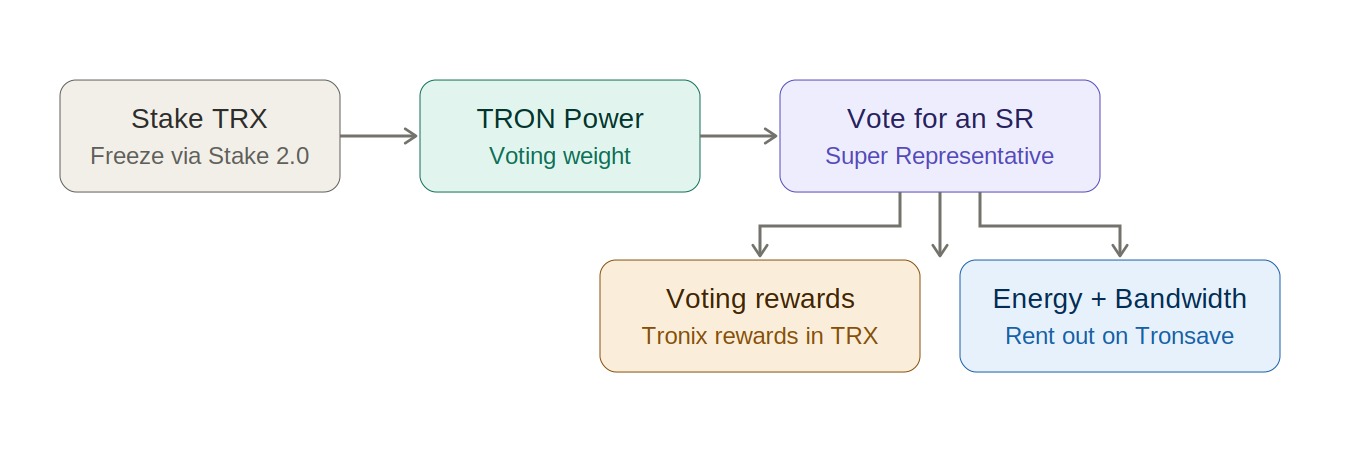
Open the “Resource” or “Freeze” area, select Energy, and enter the TRX amount. Staking generates energy and also earns voting rewards if you vote for Super Representatives — historically in an approximate 3.7–4.7% APY range (as of 2026; varies with network conditions, not guaranteed; verify against a primary source). Remember that withdrawing staked TRX later triggers a 14-day unstaking lock-up.
3. Delegate energy to another wallet
Go to the “Delegate” section, paste the recipient’s address, set the energy amount, and confirm with your PIN or biometrics. Double-check the address — delegation cannot fix a wrong recipient. Klever and TronLink walk you through each field to reduce mistakes.
4. Verify and manage the delegation
Confirm the DelegateResource transaction on Tronscan; the recipient’s energy balance updates almost immediately. To reverse it, use “Undelegate” and choose the amount. Keeping the transaction hash lets you (or the recipient) independently verify the delegation occurred on-chain.
| Step | Action | Tool | Notes |
| 1 | Choose wallet | TronLink / Klever / Tronscan | Hold enough TRX |
| 2 | Stake TRX | Resource / Freeze | Select “Energy” |
| 3 | Delegate energy | Delegate section | Verify recipient address |
| 4 | Confirm & verify | PIN / Tronscan | Save the tx hash |
How much TRX do you need, and is the ratio fixed?
No — the energy you receive per staked TRX is dynamic. It is determined by the total amount of TRX frozen for energy across the whole network, so the rate shifts over time. Older guides quote a fixed “1,000 TRX ≈ 10,000 energy,” but you should always read the current rate rather than assume it.
- Check the live rate: Tronscan’s resource/energy statistics show the current network-wide energy parameters.
- Estimate before staking: a single USDT (TRC20) transfer typically needs tens of thousands of energy, so size your stake to your actual transaction volume.
- Top up flexibly: if a stake produces less energy than expected because the network rate changed, stake more or rent energy short-term.
What are the benefits and risks of delegating energy?
Delegation has clear upsides, but a few trade-offs are worth understanding before you commit capital.
- Lower fees: recipients save on TRC20 transfer costs.
- Capital efficiency: staked TRX produces a usable, shareable resource.
- Flexibility: energy can be undelegated when you need it back.
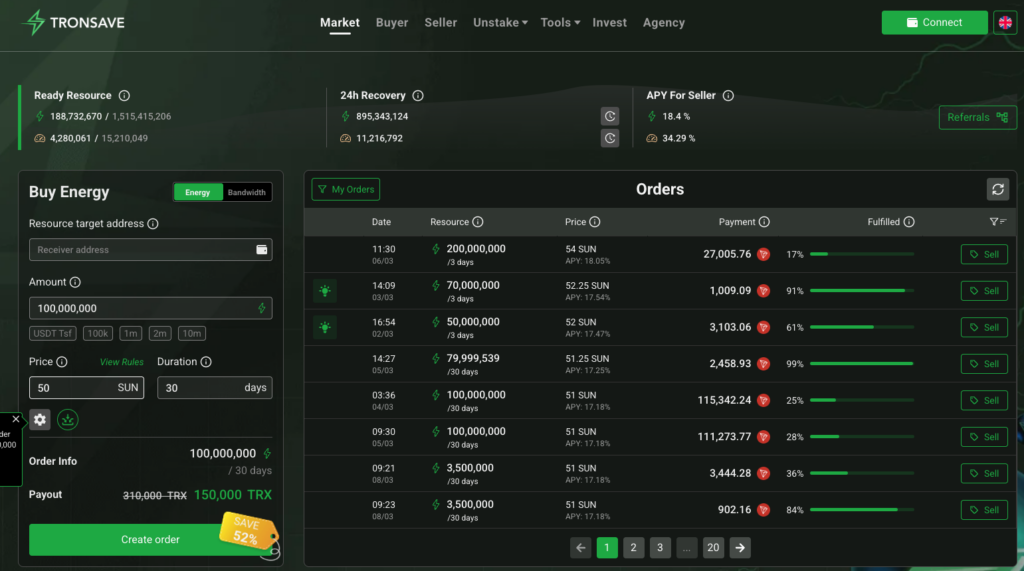
- Potential income: you can rent surplus energy on a marketplace — TronSave is one option, but staking-for-votes and other rental platforms also exist. Any quoted yield (often discussed in the 20–25% range; as of 2026, varies with demand, not guaranteed) should be treated as an estimate.
Risks to weigh: APYs and rental rates fluctuate with demand; the 14-day unstaking lock-up limits how quickly you can exit; and a mistyped recipient address can waste delegated energy. None of this is financial advice — do your own research.
How do you maximize value without overcommitting?
If your goal is to offset transaction costs or earn from surplus energy, a measured approach works best.
- Match stake to need: stake enough TRX to cover your expected transaction load plus a margin, rather than locking up more than necessary.
- Compare platforms: evaluate marketplace rates, fees, and reliability across providers — including direct staking rewards — before listing energy for rent.
- Use automation carefully: some platforms let you grant a delegation permission so energy is assigned to renters automatically. Review exactly which permissions you approve in your wallet.
| Approach | Goal | Consideration |
| Self-delegate | Cut your own fees | No yield, full control |
| Stake & vote | Earn SR voting rewards | ~3.7–4.7% APY (2026, varies) |
| Rent energy out | Earn from surplus | Yield fluctuates with demand |
Frequently asked questions (FAQ)
1. How much TRX do I need to delegate energy on Tron?
There is no fixed minimum, but you need enough staked TRX to generate the energy a transaction requires. Because the rate is dynamic, check Tronscan’s current energy parameters before staking.
2. Can I undelegate energy?
Yes. Use the “Undelegate” option in your wallet, choose the amount, and confirm. The energy returns to your account, though withdrawing the underlying staked TRX is subject to the 14-day unstaking period.
3. Is delegating energy profitable?
It can offset fees and, if you rent surplus energy, generate TRX. Returns vary with market demand and are not guaranteed — treat any APY figure as an estimate, not a promise.
4. What is the difference between energy and bandwidth?
Energy powers smart contracts and TRC20 transfers; bandwidth covers basic TRX transfers. Accounts receive a small free daily bandwidth allowance, while energy generally requires staking.
5. How do I track delegated energy?
Look up the DelegateResource transaction on Tronscan or your wallet history. Saving the transaction hash lets anyone verify the delegation on-chain.
6. Does energy accumulate over time?
No. Energy regenerates from your stake but does not stockpile day to day. To have more available, stake more TRX or keep existing stakes in place.
Conclusion
Knowing how to delegate energy on Tron lets you cut transaction costs and put staked TRX to work. Choose a wallet, stake for energy, delegate to a recipient, and verify the result on Tronscan. Compare options — self-delegation, staking for votes, and marketplaces like TronSave — and always size your stake to your real needs.
⚠️ Not financial advice. This article is for educational and informational purposes only and reflects the author’s opinion at the time of writing. It is not investment, financial, legal, or tax advice. Cryptocurrency is highly volatile and you can lose your entire principal; prices, APYs, and on-chain fees change constantly and may be out of date. Always do your own research (DYOR) and consult a licensed financial advisor before buying, selling, staking, or lending any digital asset.
Disclosure: This is the official TronSave blog. TronSave sells TRON energy/resource (fee-reduction) services and has a commercial interest in the products and topics covered here.