

To buy Tron to my wallet, choose a reputable exchange or wallet app, fund it with fiat or crypto, purchase TRX, then withdraw to your own TRON address over the TRC-20 network. With self-custody you hold the private keys, so the funds stay fully under your control.
Key Takeaways
- Fast and simple: Most buyers can move TRX from an exchange into a personal wallet in roughly 10–30 minutes.
- Always use TRC-20: TRX sent over the wrong network (for example ERC-20) can be lost permanently.
- Self-custody = control: Withdrawing to your own wallet means you, not the exchange, hold the keys.
- Verify everything: Confirm the address, the network, and that the platform is the official one before you send.
- Fees vary: Card purchases cost more than bank transfers; compare before you commit.
How do you buy Tron to my wallet step by step?
The most common route is a centralized exchange (CEX) because it accepts fiat and supports direct TRC-20 withdrawals. Platforms such as Binance, Kraken, Crypto.com, and OKX are widely used and run standard KYC checks for fiat deposits.
- Sign up and verify: Create an account and complete identity verification (KYC), which is required for most fiat purchases.
- Deposit funds: Add fiat by bank transfer, card, or a supported payment service. In the US, an ACH transfer is often the cheapest funding method.
- Buy TRX: Find a TRX pair (such as TRX/USDT), enter your amount, and confirm. A market order fills fastest.
- Withdraw to your wallet: Copy your wallet’s TRX address (it starts with “T”), paste it into the exchange withdrawal screen, select the TRC-20 network, and send.
Withdrawals usually arrive in about 5–30 minutes thanks to TRON’s high throughput. You can confirm any transfer by pasting the transaction hash into TronScan, the official TRON block explorer.
Which platform should you choose to buy TRX?
Picking the right platform is the foundation of a safe purchase. Centralized exchanges are beginner-friendly and support direct withdrawals, while wallet apps with built-in on-ramps let you buy without leaving the app. The table below compares popular options; fees are approximate and change often, so verify current rates before buying.
| Platform | Payment Methods | Fees (Approx., verify) | Direct to Wallet? | Best For |
| Binance | Card, Bank, Apple/Google Pay | ~0.1% trading | Yes | Low fees |
| Kraken | Card, ACH, Apple/Google Pay | Spread + small fee | Yes | Beginners |
| Trust Wallet | Card via third-party | ~2–3% | Built-in | Mobile users |
| MoonPay | Card, Bank, Pay | ~4%+ | Yes | Instant buys |
| Ledger | Via partner exchanges | Varies | Hardware security | Long-term holding |
If you plan to move TRC-20 tokens like USDT afterward, on-chain costs matter too. Beyond the platform fee, transfers consume TRON resources (energy and bandwidth). You can pay the network fee by burning TRX, by staking TRX yourself for resources, or by renting energy. Renting from a resource marketplace such as TronSave can reduce TRC-20 transfer costs versus burning TRX outright, though the exact saving depends on current network conditions and prices.
Can you buy TRX directly inside a wallet app?
Yes. Many non-custodial wallets include an on-ramp so you can buy and store in one place. Trust Wallet and Zengo, for example, support direct purchases through providers like MoonPay or Transak. For app comparisons, see this guide to the best TRX wallet apps.
Setting up your wallet
Download the wallet from an official app store, create a new wallet, and back up your recovery (seed) phrase by writing it on paper. Never screenshot or store it online, and enable biometrics or a PIN.
Making the purchase
- Tap “Buy” in the app.
- Select TRX and enter the fiat amount.
- Choose a payment method: card, Apple Pay, or bank.
- Confirm — TRX is delivered to your in-app TRON address.
This is the simplest way to buy Tron to my wallet because there is no separate withdrawal step, though built-in on-ramps usually charge a higher fee than a CEX.
What are the security risks and how do you avoid them?
Crypto transactions are irreversible — one wrong address or network and the funds are gone. Treat security as mandatory, not optional.
- Verify the network: TRX moves on TRC-20; sending to a mismatched network (such as ERC-20) can cause permanent loss.
- Avoid phishing: Only use official apps and URLs; fake “TRON wallet” sites and support accounts are common scams.
- Enable 2FA: Prefer an authenticator app over SMS.
- Start small: Send a small test amount first, then transfer the rest.
- Consider a hardware wallet: Devices like Ledger keep keys offline for larger holdings.
Risk note: Cryptocurrency is highly volatile and you can lose money. Prices, fees, and KYC requirements change frequently, so verify details against each platform’s official pages before acting.
FAQ
What is the cheapest way to buy Tron to my wallet?
Funding a major exchange by bank transfer (for example ACH in the US) and withdrawing over TRC-20 is usually cheaper than card or in-app on-ramp purchases. Compare current fees first.
Do I need KYC to buy TRX?
For fiat purchases on most regulated platforms, yes. Decentralized exchanges may skip KYC but require you to already hold crypto to swap.
Can I buy TRX with PayPal directly to my wallet?
Not natively on most wallets, but some on-ramp providers such as Transak or MoonPay support PayPal or card-linked options inside apps like Trust Wallet.
How long does TRX take to arrive in my wallet?
Typically about 5–30 minutes on TRC-20, since TRON confirms transactions quickly. Network congestion can add delay.
Is Tron safe to hold in a personal wallet?
A reputable self-custody wallet is generally safer for long-term holding than leaving funds on an exchange, provided you secure your seed phrase. This is not financial advice.
What does it cost to send TRC-20 tokens after I buy?
On-chain transfers consume energy and bandwidth. You can burn TRX, stake for resources, or rent energy from a marketplace; the cheapest option depends on how often you transact and current prices.
Conclusion
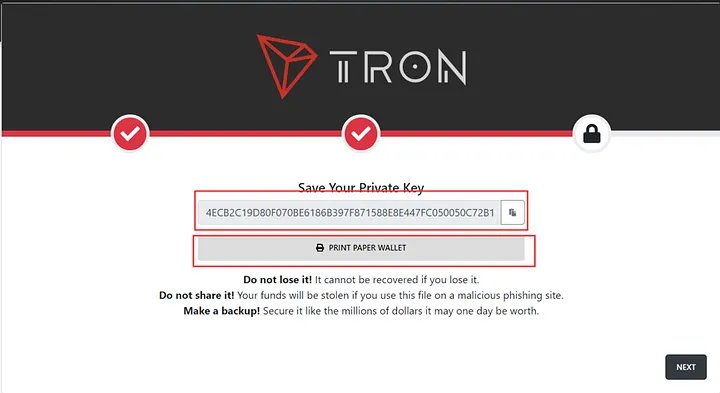
Learning to buy Tron to my wallet comes down to four habits: pick a reputable platform, verify the TRC-20 network and address, secure your keys, and start with a small test transfer. Whether you use a CEX like Binance or a built-in wallet on-ramp, self-custody gives you full control over your TRX on the TRON blockchain. To reduce ongoing transfer costs, compare staking your own TRX against renting energy from a marketplace, and always do your own research before moving real funds.
⚠️ Not financial advice. This article is for educational and informational purposes only and reflects the author’s opinion at the time of writing. It is not investment, financial, legal, or tax advice. Cryptocurrency is highly volatile and you can lose your entire principal; prices, APYs, and on-chain fees change constantly and may be out of date. Always do your own research (DYOR) and consult a licensed financial advisor before buying, selling, staking, or lending any digital asset.
Disclosure: This is the official TronSave blog. TronSave sells TRON energy/resource (fee-reduction) services and has a commercial interest in the products and topics covered here.



