
To freeze TRON for energy, open a TRON wallet such as TronLink, choose the Stake (formerly “Freeze”) option, select Energy as the resource, enter the TRX amount, and confirm. Energy is credited within seconds and your staked TRX stays locked until you unstake and wait 14 days.
Key takeaways
- “Freeze” is now “Stake”: TRON’s Stake 2.0 upgrade renamed freezing to staking, though many users still say “freeze.”
- Energy powers smart contracts: staking TRX gives you Energy for TRC-20 transfers (like USDT) instead of burning TRX on fees.
- 14-day unlock: you can request unstaking anytime, but the TRX is only withdrawable after a 14-day waiting period.
- Rewards vary: voting for a Super Representative can earn rewards (commonly cited around 5–8% APR as of 2026; not guaranteed and SR-dependent).
- Alternatives exist: energy rental platforms and free daily bandwidth can cover light usage without locking funds.
What does it mean to freeze TRON for energy?
When you freeze TRON for energy, you lock a quantity of TRX in exchange for Energy, one of the two resources that keep the TRON network running. Energy fuels smart-contract operations such as USDT transfers and DeFi interactions. The amount of Energy you receive is proportional to your stake relative to the total TRX staked across the network.
The TRON blockchain uses two resources: bandwidth and energy. Bandwidth covers simple TRX transfers, while Energy is required for contract calls. Every account gets 600 free bandwidth units daily, but Energy must be obtained by staking TRX or by paying (burning) TRX per transaction.
Why the term changed from “freeze” to “stake”
The TRON Foundation’s Stake 2.0 upgrade replaced the original “freeze” mechanism. Under Stake 2.0 you can partially unstake, delegate resources to other addresses, and keep your votes intact. The word “freeze” persists in everyday use, so this guide treats “freeze TRON for energy” and “stake TRX for Energy” as the same action.
How do you freeze TRON for energy step by step?
Staking TRX for Energy is straightforward in wallets like TronLink, Trust Wallet, or Klever. The flow below mirrors TronLink, the most common choice.
- Step 1 — Set up your wallet: open a TRON-compatible wallet and fund it with TRX from an exchange. You need a minimum of 1 TRX to stake.
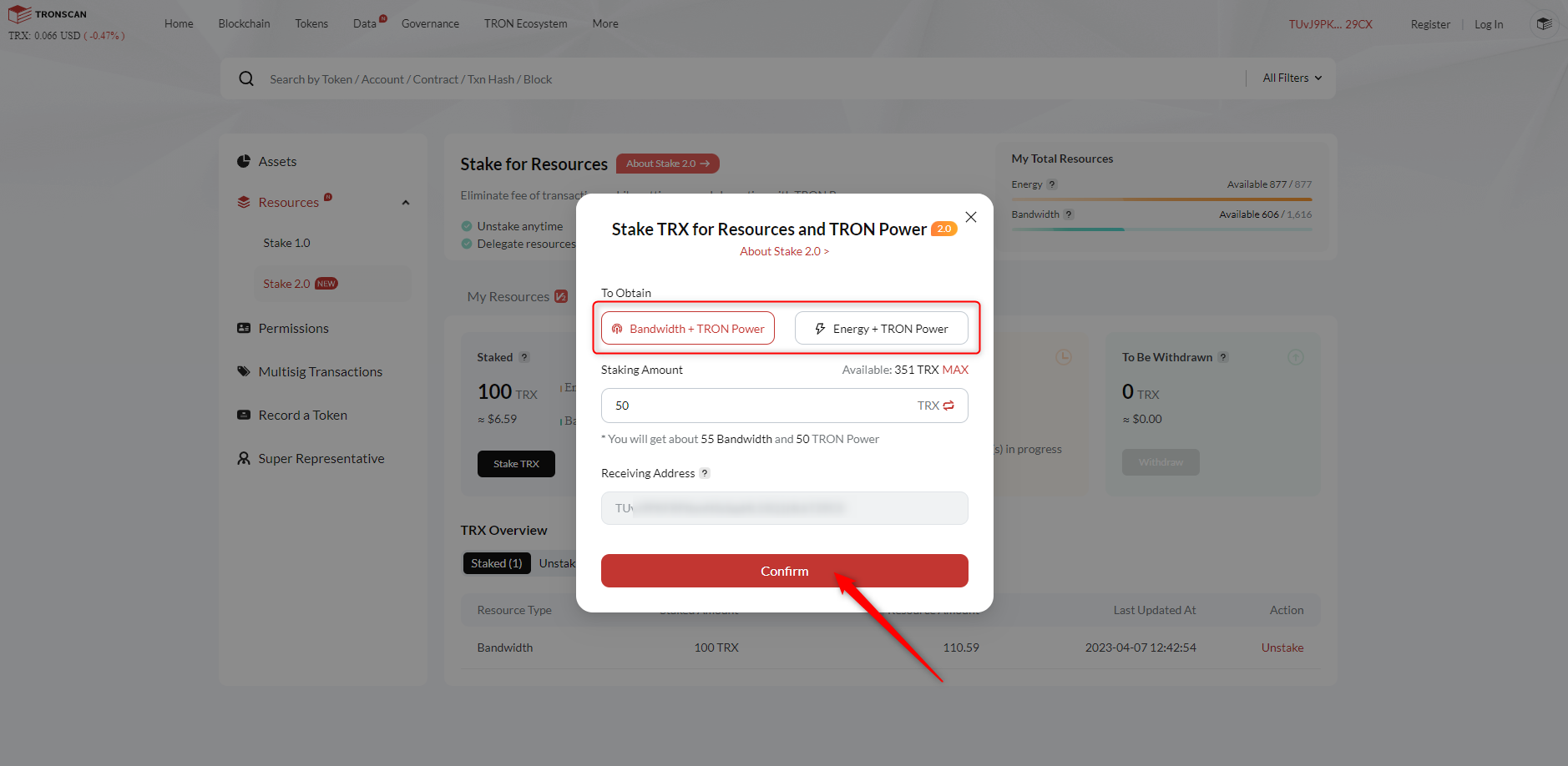
- Step 2 — Open the Stake screen: find “Stake” (or “Freeze” on older builds) under resource management, then choose Energy rather than bandwidth.
- Step 3 — Enter the amount and confirm: input how much TRX to stake, review the resource type, and sign with your PIN or key. Energy is credited within seconds.
- Step 4 — Verify and monitor: check your Energy balance on TronScan. Energy regenerates over roughly 24 hours after use.
| Step | Action | Notes |
| Set up wallet | Open TronLink or Trust Wallet | Minimum 1 TRX balance |
| Open Stake | Select “Energy,” enter amount | Do not pick bandwidth by mistake |
| Confirm | Sign with PIN/private key | Energy credited in seconds |
| Monitor | Check Energy on TronScan | Use the TRON resource calculator to plan |
How much should you stake? It depends on usage. A single USDT (TRC-20) transfer typically needs roughly 65,000 Energy. Staking a larger amount of TRX yields more Energy, but exact figures vary with network conditions, so estimate with the official resource calculator and verify your result on TronScan after staking.
What are the benefits of staking TRX for Energy?
Choosing to stake rather than burning TRX per transaction offers three practical advantages for active users.
- Lower transaction costs: with enough Energy, recurring TRC-20 transfers cost no extra TRX in fees, versus paying per transfer when you have none.
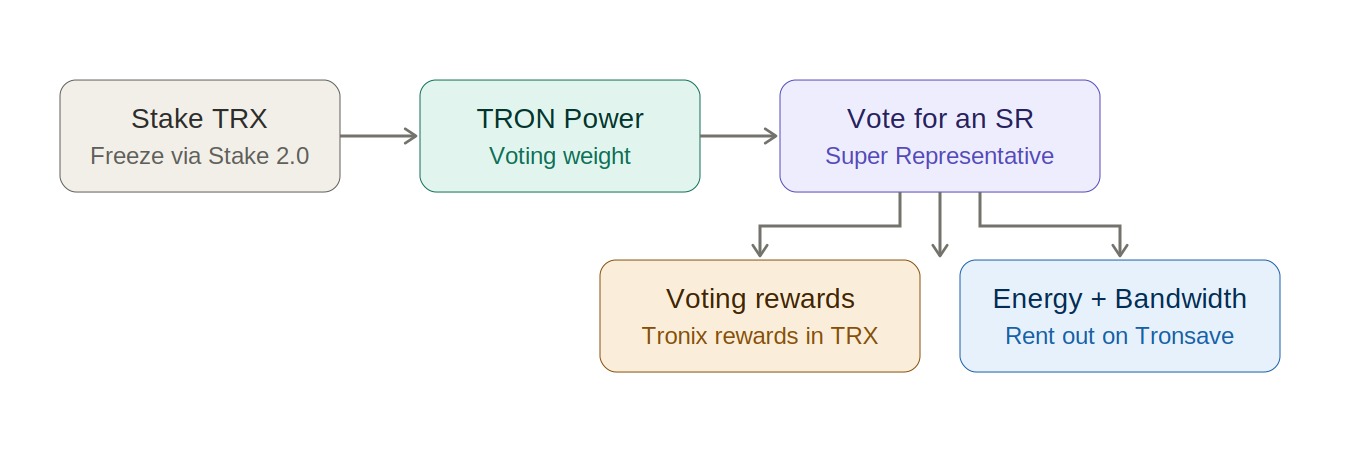
- Voting rewards: staking grants TRON Power, letting you vote for Super Representatives and earn a share of block rewards. Returns vary by SR and are not guaranteed.
- Network participation: your votes help secure and govern the network, and Stake 2.0 lets you adjust positions without forfeiting votes.
A note on returns: APR figures circulated for SR voting (often quoted around 5–8% as of 2026) depend entirely on the Super Representative you choose and change over time. Treat any single number as indicative, not promised, and check a current SR rewards dashboard before relying on it.
What are the alternatives to freezing TRX?
You do not always have to lock TRX for 14 days. Depending on how often you transact, other options may be cheaper or more flexible.
- Rent energy: energy-rental services let you obtain Energy on demand without staking. Platforms such as TronSave are one option; staking directly and using other marketplaces are alternatives. Renting suits one-off transactions or testing dApps.
- Use free daily bandwidth: the 600 free bandwidth units cover basic TRX transfers. For occasional sends, lean on bandwidth and skip Energy entirely.
- Burn TRX as a last resort: if you lack Energy, the network simply charges TRX per transaction. Fine for rare use, expensive for daily activity.
| Method | Lock-up | Best for |
| Stake TRX for Energy | 14-day unlock | Frequent, ongoing TRC-20 use |
| Rent energy | None | One-off or short-term needs |
| Free bandwidth | None | Occasional plain TRX transfers |
| Burn TRX | None | Rare transactions only |
Common mistakes to avoid
- Staking too little: if you under-stake, you may run out of Energy mid-week and start burning TRX. Estimate your monthly transaction count first.
- Picking the wrong resource: selecting bandwidth when you need Energy is a frequent error. Always confirm “Energy” before signing.
- Ignoring the unlock window: remember that unstaked TRX is locked for 14 days. Keep some liquid TRX aside for urgent needs.
- Skipping verification: always confirm the staked amount and resulting Energy on TronScan rather than assuming the wallet display is final.
Frequently asked questions
1. How much TRX should I stake for Energy?
It depends on how often you transact. Estimate your monthly TRC-20 transfers (a USDT transfer needs roughly 65,000 Energy), then use the official TRON resource calculator to size your stake. Verify the result on TronScan.
2. Can I stake TRX for both bandwidth and energy?
Yes. Each stake is separate, so you can stake one amount for Energy and another for bandwidth to cover both resource types.
3. What happens if I lack Energy for a transaction?
The network charges TRX directly for that transaction. Staking for Energy or renting energy avoids these per-transaction costs.
4. How long does unstaking TRX take?
Under Stake 2.0 you can request unstaking anytime, but the TRX is only withdrawable after a 14-day waiting period. Plan around your liquidity needs.
5. Do I earn rewards when I freeze TRON for energy?
Staking grants TRON Power for voting. Voting for a Super Representative can earn rewards, but the rate varies by SR and is not guaranteed. Verify current rates on an SR rewards source.
6. How does Stake 2.0 differ from Stake 1.0?
Stake 2.0 allows partial unstaking and resource delegation without canceling votes, whereas Stake 1.0 used a rigid 3-day lockup and was less flexible.
Conclusion
Learning to freeze TRON for energy helps you cut recurring fees, optionally earn voting rewards, and power TRC-20 transfers and dApp activity. Stake what matches your real usage, remember the 14-day unlock, and verify Energy on TronScan. If you only need Energy occasionally, renting or free bandwidth may be the simpler path.
⚠️ Not financial advice. This article is for educational and informational purposes only and reflects the author’s opinion at the time of writing. It is not investment, financial, legal, or tax advice. Cryptocurrency is highly volatile and you can lose your entire principal; prices, APYs, and on-chain fees change constantly and may be out of date. Always do your own research (DYOR) and consult a licensed financial advisor before buying, selling, staking, or lending any digital asset.
Disclosure: This is the official TronSave blog. TronSave sells TRON energy/resource (fee-reduction) services and has a commercial interest in the products and topics covered here.



