Learning how to send USDT on Tron takes only a few steps: open a TRC-20 wallet, select USDT, paste the recipient’s “T” address, enter the amount, keep a little TRX for fees, and confirm. Transfers usually settle in seconds on the Tron (TRC-20) network.
Important: Crypto transactions are irreversible. A transfer sent to the wrong address or wrong network is almost always unrecoverable, so verify every detail before confirming. This guide is educational and is not financial advice; always do your own research.
Key Takeaways
- To send USDT on Tron, use a TRC-20-compatible wallet (TronLink, Trust Wallet, Klever) and a recipient address that starts with “T”.
- A standard TRC-20 USDT transfer consumes roughly 65,000 energy; without rented or staked resources that costs approximately 13-27 TRX (verify against current TronScan/TRON parameters, which change over time).
- Keep a small TRX buffer (around 5-10 TRX) so transactions don’t fail.
- Never send TRC-20 USDT to an ERC-20 (Ethereum) address; cross-network transfers need a legitimate bridge.
- Energy can be obtained by staking (freezing) TRX yourself or by renting from platforms like TronSave; both can lower the TRX you burn per transfer.
👉 Try it free: use the USDT Fee Savings Calculator to see exactly how much you’d save by renting TRON energy instead of burning TRX.
Why send USDT on the Tron network?
Tron’s TRC-20 standard is one of the most widely used rails for moving Tether (USDT) because transfers confirm in seconds and on-chain fees are typically low and predictable. Unlike Ethereum, where gas can spike during congestion, Tron’s resource model keeps costs relatively stable, which is why it is popular for remittances and high-volume transfers.
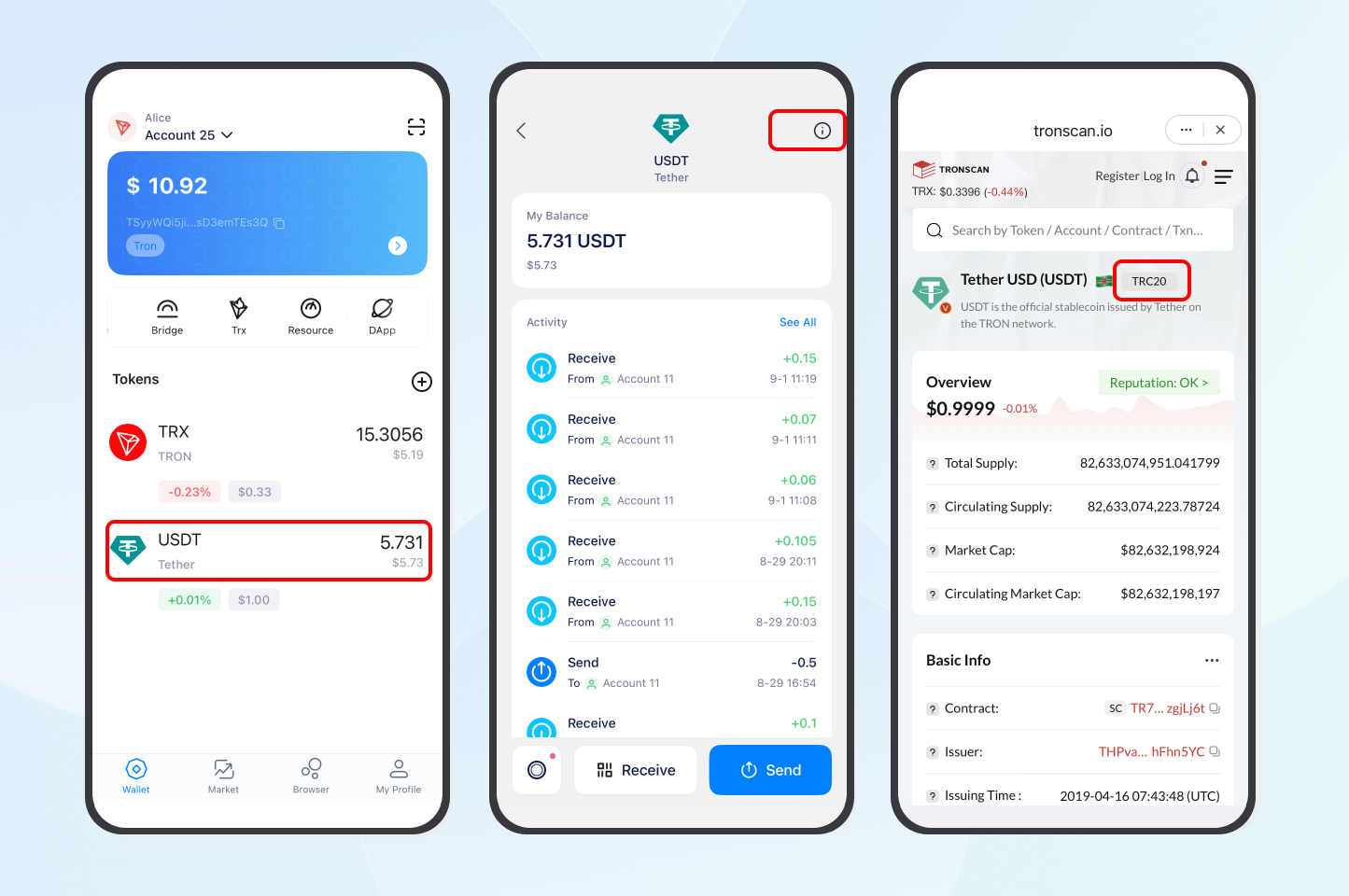
USDT on Tron is issued by Tether as a TRC-20 token. You can confirm contract and supply details directly on Tether’s official site or on a block explorer such as TronScan. For background on the token standard itself, see our explainer on TRC-20 and USDT on Tron.
What do you need before sending USDT on Tron?
Before your first transfer, make sure you have a compatible wallet, the correct recipient address, and a little TRX for fees. Getting these basics right is what prevents the most common (and costly) mistakes.
Choose a Tron-compatible wallet
Select a wallet that supports the Tron blockchain and TRC-20 tokens, such as TronLink, Trust Wallet, or Klever Wallet. Download only from official sources (the App Store, Google Play, or the wallet’s verified website) to avoid fake apps and scams.
Obtain the recipient’s TRC-20 address
Get the recipient’s Tron wallet address, which starts with the letter “T” (for example, T9yD…). Confirm it is a TRC-20 address: sending to an Ethereum ERC-20 address instead will result in lost funds. Copy and paste the address rather than typing it.
Keep enough TRX for fees
Tron transactions consume energy and bandwidth. When you don’t have enough staked or rented energy, the network burns TRX to cover it. A standard TRC-20 USDT transfer uses about 65,000 energy, which is roughly 13-27 TRX at typical parameters (this varies as the network adjusts energy pricing; verify on TronScan before relying on a figure). Keeping a buffer of about 5-10 TRX avoids failed transactions.
How do you send USDT on Tron step by step?
Follow these steps to transfer USDT on the Tron network securely. The flow is similar across most TRC-20 wallets and exchange withdrawal screens.
- Open your wallet or exchange: Log into a TRC-20 wallet (such as TronLink or Trust Wallet) or the withdrawal section of an exchange that supports TRC-20.
- Select USDT (TRC-20): Choose Tether (USDT) as the asset and make sure the Tron (TRC-20) network is selected, not ERC-20.
- Enter the recipient’s address: Paste the “T” address and double-check the first and last characters.
- Specify the amount: Enter how much USDT to send, and confirm you have enough TRX or energy for the fee.
- Review and confirm: Verify the network, address, and amount, then confirm. The transfer typically processes in seconds.
- Check the status: Track the transaction on TronScan using the transaction hash (TxID) or your wallet address to confirm the energy consumed and fee paid.
Pro tip: Save frequently used addresses in your wallet’s address book to speed up future transfers, but still verify before every send.
How can you reduce fees when you send USDT on Tron?
The TRX you burn per transfer depends on whether you supply your own energy. There are two main ways to lower that cost, and they suit different users.
- Stake (freeze) TRX yourself: Staking TRX generates energy and bandwidth you can use for your own transactions, with no per-transfer rental cost. This suits long-term holders who transact often.
- Rent energy: Platforms such as TronSave and other energy-rental services let you rent energy short-term, which can reduce the TRX burned versus paying the raw fee. Rental savings depend on current network parameters and pricing, so treat any percentage as approximate and check live rates.
- Use GasFree-style features: Some wallets (for example, Klever) let you pay fees in USDT when TRX is low.
For a deeper cost breakdown, see our guide on how much it costs to send USDT on TRC-20. Whichever route you pick, compare staking versus renting against your transfer frequency rather than assuming one is always cheaper.
What mistakes should you avoid?
Most lost-fund situations come from a handful of avoidable errors. Review this table before sending.
| Common issue | Solution |
| Wrong network selected | Confirm TRC-20 (Tron) is chosen, not ERC-20, before sending. |
| Insufficient TRX for fees | Top up TRX, stake for energy, or use a GasFree-style wallet like Klever. |
| Incorrect recipient address | Copy-paste the address and verify the first and last characters. |
| Trying a direct cross-chain send | Use a legitimate cross-chain bridge; a same-chain DEX like SunSwap is not a bridge. |
Which wallet should you use for Tron transfers?
A reliable wallet makes sending USDT on the Tron network simpler and safer. Here is how the most popular options compare.
| Wallet | Key features | Best for |
| TronLink | Browser extension and mobile app, deep DApp integration | Tron ecosystem users |
| Trust Wallet | Multi-chain support, encrypted key storage | Multi-crypto users |
| Klever Wallet | GasFree-style fee payment, beginner-friendly | Cost-conscious users |
All three support TRC-20 USDT; the right choice depends on whether you prioritize DApp access, multi-chain holdings, or paying fees without TRX.
Frequently asked questions about how to send USDT on Tron
Q: Can I send USDT to an Ethereum address?
A: No. USDT on Tron (TRC-20) cannot be sent directly to an Ethereum (ERC-20) address. Use a reputable cross-chain bridge to move funds between networks. Note that SunSwap (formerly JustSwap) is a same-chain Tron DEX, not a cross-chain bridge.
Q: How much TRX do I need for fees?
A: A standard TRC-20 USDT transfer uses about 65,000 energy, which is roughly 13-27 TRX without staked or rented resources. This varies with network parameters, so verify the current figure on TronScan; keeping 5-10 TRX spare is a safe buffer.
Q: How long does a USDT transfer take on Tron?
A: Transfers usually complete within seconds thanks to Tron’s high-throughput blockchain, though exchange withdrawals may add their own processing time.
Q: What happens if I send USDT to the wrong address?
A: Funds sent to an incorrect address are usually unrecoverable because blockchain transactions are irreversible. Always verify the recipient’s address before confirming.
Q: Can I send USDT without holding TRX?
A: Sometimes. Some wallets (like Klever) allow fee payments in USDT via GasFree-style features, and staked or rented energy reduces TRX use. Otherwise, TRX is needed to cover energy fees.
Q: Is renting energy cheaper than just paying the fee?
A: It can be, especially for frequent or large transfers, but savings depend on live rental rates and network parameters. Compare the current rental price against the TRX you would otherwise burn before deciding.
Conclusion
Knowing how to send USDT on Tron comes down to a few habits: use a trusted TRC-20 wallet, confirm the recipient’s “T” address and network, keep a small TRX buffer, and double-check everything before confirming. If you transfer often, weigh staking your own TRX for energy against renting from a service like TronSave to keep fees down, and always verify current costs on a primary source like TronScan before you send.
⚠️ Not financial advice. This article is for educational and informational purposes only and reflects the author’s opinion at the time of writing. It is not investment, financial, legal, or tax advice. Cryptocurrency is highly volatile and you can lose your entire principal; prices, APYs, and on-chain fees change constantly and may be out of date. Always do your own research (DYOR) and consult a licensed financial advisor before buying, selling, staking, or lending any digital asset.
Disclosure: This is the official TronSave blog. TronSave sells TRON energy/resource (fee-reduction) services and has a commercial interest in the products and topics covered here.
Running a business? Learn how to accept USDT (TRC-20) payments with low fees and keep settlement cheap.