
TronSave Smart Matching is an order mode for large TRON energy rentals: instead of waiting for a single provider to fill everything in one shot, the market lets providers keep re-filling your order as their energy frees up — and any lock time you don’t end up using is refunded automatically. This guide explains how it works, what the requirements are, and how to switch it on.
What is TronSave Smart Matching?
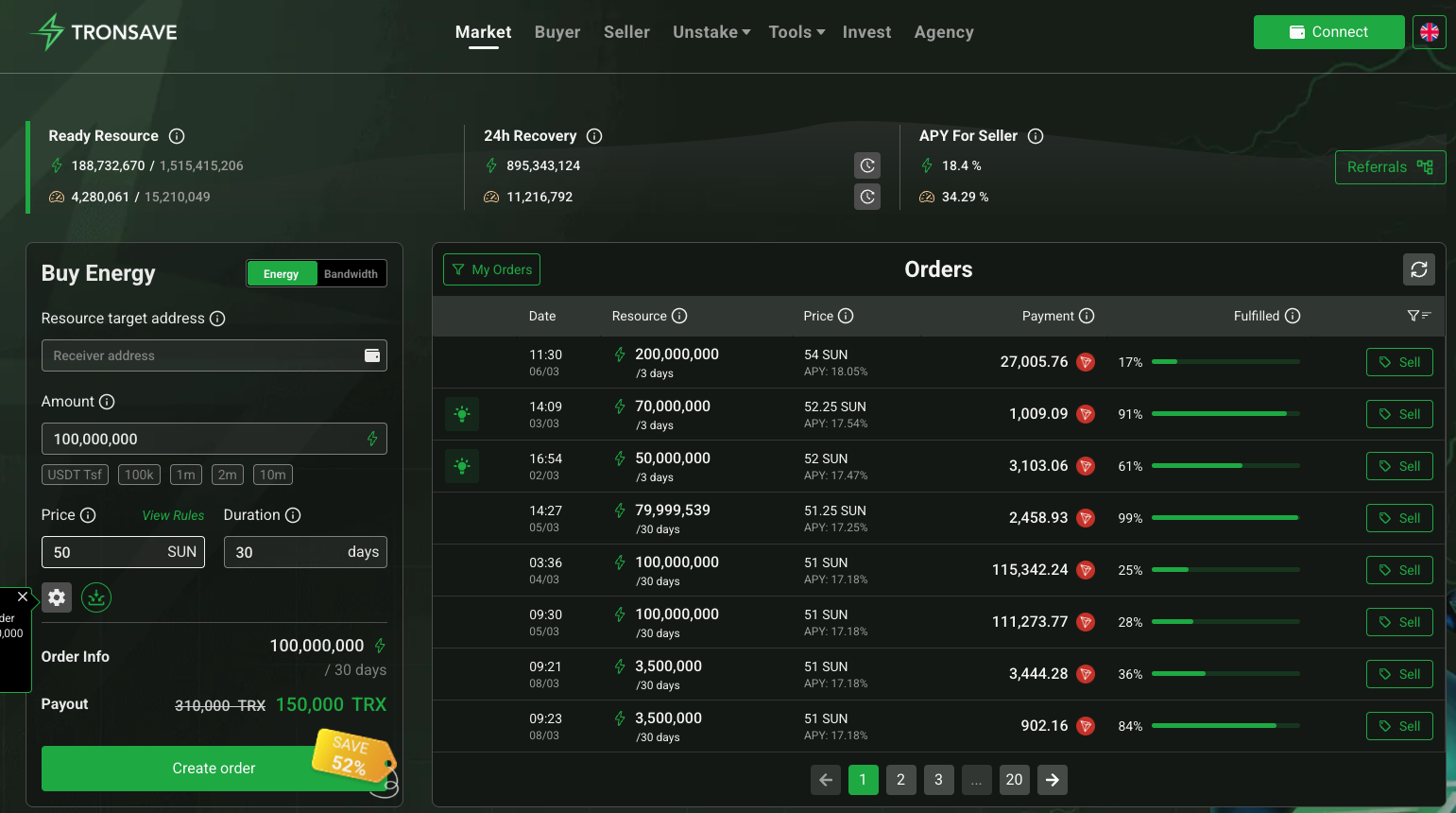
Smart Matching is a toggle in the buy widget on the TronSave energy market, right next to the amount and duration fields. Turn it on and your order becomes a smart order: providers are allowed to keep selling to you as their energy refills, with no loss on your side. In the app’s own words, it “lets providers keep selling to you as their energy refills.”
It is built for big orders. The toggle only becomes available when your order is at least 10,000,000 energy with a duration of 3 days or longer (the app greys it out below those thresholds), and it applies to energy only — the bandwidth tab doesn’t offer it. Once placed, the order carries a “Smart Matching” badge in your Orders list so you can tell it apart from standard rentals.
Why do large energy orders need Smart Matching?
On the TRON network, energy comes from staked TRX — providers stake, receive energy, and delegate it to renters for a period (see TRON’s official resource model documentation). A delegation is a lock: while a provider’s energy is delegated to you, they can’t sell it to anyone else, and when the lock expires they reclaim it.
That lock is exactly why very large orders are slow to fill the normal way. Few providers have tens of millions of energy sitting free at any given moment, so a big order either waits or gets filled in fragments by many sellers.
Smart Matching changes the mechanics. With the current version (v2), the market can re-match the same provider after every reclaim: a seller fills part of your order, their energy comes back at the end of a lock, and it flows straight back into your order again — the order extends automatically, without you reposting anything. Providers’ idle energy is put back to work faster, which is why smart orders tend to fill quicker than standard large orders.
What does it cost — and what gets refunded?
You pay the market price for the energy you receive, exactly like a standard rental. The difference is in how partial fills are settled. Because delegations arrive at different times, some lock time inevitably goes unused — and with Smart Matching, that unused lock time is refunded back to your internal TronSave balance automatically.
Every refund is visible: open the order’s detail view and you’ll find a refund ledger alongside the usual delegation list, showing each provider’s delegation, its timestamp and transaction, and the amount refunded for the time you didn’t use. That’s what “no loss” means in practice — you are never billed for energy-time that was locked but not delivered.
How do you enable TronSave Smart Matching? (step by step)
- Open the market. Go to tronsave.io/market and connect your wallet (TronLink, Trust Wallet, or any supported TRON wallet).
- Pick the Energy tab in the buy widget. Smart Matching is energy-only, so it won’t appear on the bandwidth tab.
- Enter an amount of at least 10,000,000 energy. Below that, the toggle stays disabled with a tooltip explaining the minimum.
- Set the duration to 3 days or longer. Shorter rentals don’t qualify — the re-matching cycle needs room to work.
- Flip the Smart Matching toggle. It lights up once your amount and duration meet the requirements.
- Review and confirm. Check the total price, then sign the transaction in your wallet as usual.
- Track it. In your Buyer dashboard’s Orders tab, the order shows a Smart Matching badge. Open its detail view to watch fills arrive and refunds accumulate.
Standard order vs Smart Matching
| Standard order | Smart Matching order | |
|---|---|---|
| Best for | Everyday amounts | Large orders (10M+ energy) |
| Minimum size | Any listed amount | ≥ 10,000,000 energy |
| Minimum duration | Any listed duration | 3 days or longer |
| Resource | Energy or bandwidth | Energy only |
| Fill behaviour | Fills from providers’ currently free energy | Providers re-match after every reclaim; the order extends automatically |
| Unused lock time | — | Refunded to your internal balance |
Requirement values are what the app displays as of 2026; the platform can adjust them over time.
When is Smart Matching the wrong choice?
- Small, immediate needs. If you just need enough energy for a handful of USDT transfers, a normal instant purchase — or ZapBuy for the fastest path — is simpler and has no minimums.
- Short durations. Anything under 3 days doesn’t qualify; place a standard order instead.
- Bandwidth. Not supported — bandwidth rentals are always standard orders.
- A standard order that simply is not matching. Smart Matching is for orders too large for the book, not for a mispriced one — see why an energy order is not filling before reaching for it.
- Keeping one wallet permanently topped up. That’s a different problem, solved by Auto-Buy, which re-orders automatically when your balance drops below a threshold.
FAQ
Does Smart Matching work for bandwidth?
No. It is an energy-only feature; the toggle doesn’t appear on the bandwidth tab of the buy widget.
What are the minimum requirements?
At least 10,000,000 energy and a duration of 3 days or more, as displayed in the app in 2026. Orders below either threshold can’t enable the toggle.
Where do my refunds go?
To your internal TronSave account balance, automatically. The order’s detail view includes a refund ledger listing every refunded delegation with its transaction.
Do I need to repost the order when a provider reclaims their energy?
No. Smart Matching v2 re-matches the same provider after every reclaim and extends the order automatically until it completes or you cancel it.
How can I tell which of my orders are smart orders?
They carry a “Smart Matching” badge in the Orders table, and the order detail view labels them explicitly.
Can I create smart orders programmatically?
The toggle described here is part of the website buy flow. If you’re automating purchases, start with the TronSave API guide and check the API docs for current smart-order support.
Moving serious volume? Place your next large order with TronSave Smart Matching on the energy market — faster fills, and every unused minute refunded.



