If you’re searching for a tron energy and bandwidth calculator to estimate transaction costs on the TRON blockchain, this is the essential tool to help you avoid unwanted TRX burn fees. This article provides a detailed guide on calculating bandwidth and energy, using available calculators, and practical tips to optimize resources for smoother transactions, especially with USDT or TRC20 tokens. Ready to stop burning TRX? Let’s dive in.
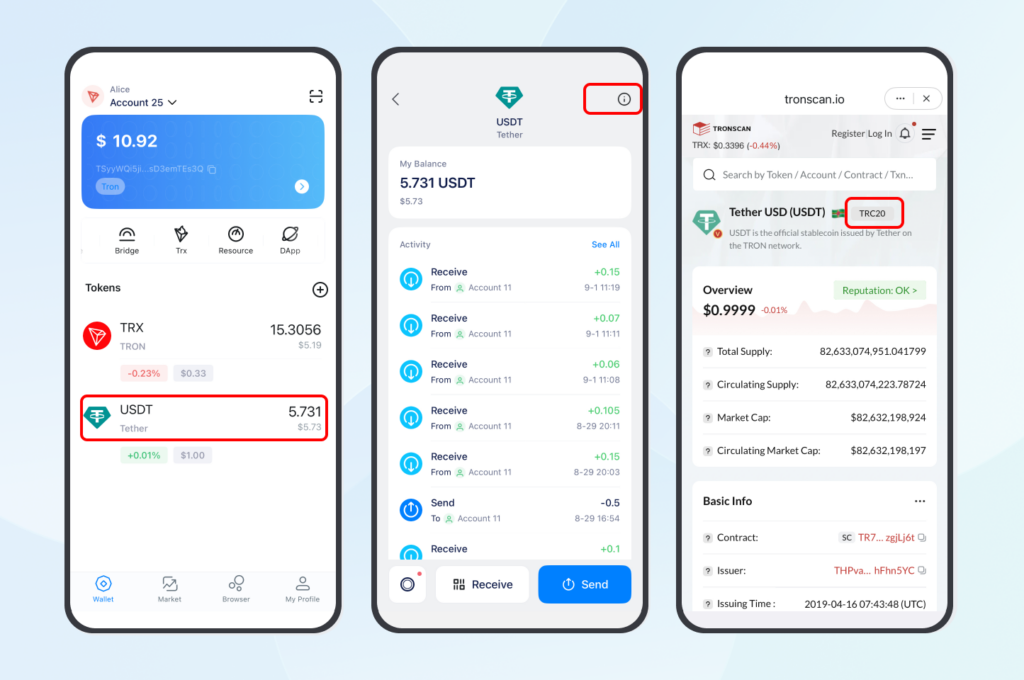
Understanding TRON’s Bandwidth and Energy
What Are Bandwidth and Energy?
Bandwidth and energy are the two core resources on the TRON network that power transactions without burning TRX as fees. Bandwidth is mainly used for the byte size of basic transactions like TRX or TRC10 transfers, while energy is required for more complex smart contract operations, such as USDT transfers via TRC20. Every user receives 600 free bandwidth points daily, sufficient for a few small transactions, but if you run out, the system automatically burns TRX to cover the shortfall.
Many users have experienced sending USDT only to see fees spike to 13 TRX, making small transfers surprisingly expensive. This happens when energy is insufficient – transferring to a new address can consume up to 130,000 energy. Understanding these two concepts allows you to plan better and avoid unpleasant surprises in DeFi or NFT activities on TRON.
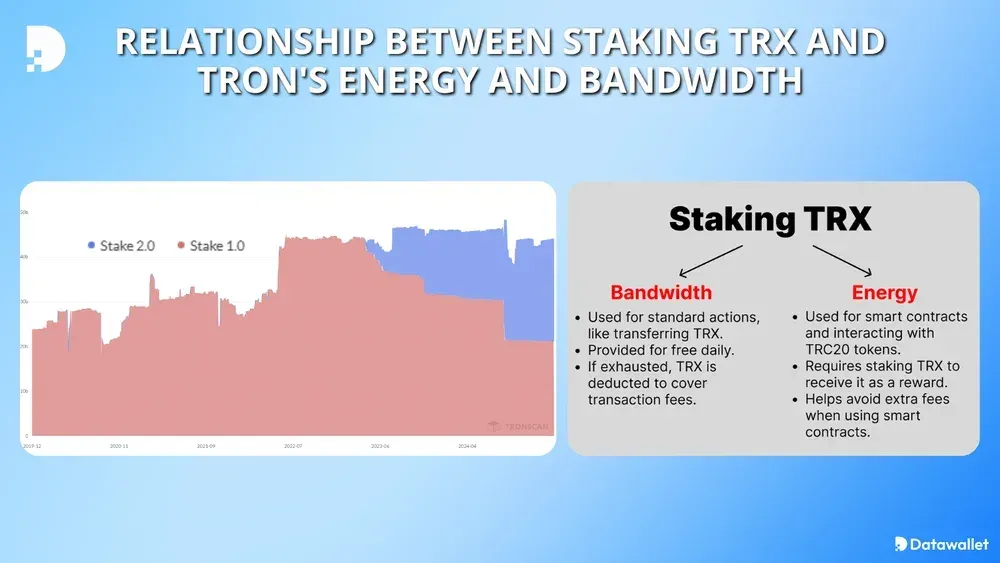
This diagram shows the relationship between staking TRX and receiving bandwidth/energy – the more you stake, the more free resources you get, leading to long-term fee reduction.
Their importance lies in long-term cost savings. With TRON’s growth in 2026, as DApps like JustSwap become more popular, calculating bandwidth and energy in advance not only ensures successful transactions but also maximizes profits.
Why They Matter
High fees can wreck your DeFi trades. The fix? Stake TRX or rent energy to avoid burns. An user was burning $10 daily on USDT transfers until she rented 64,000 energy for $1.31 on tronsave.io – saving 63%. That’s the goal here.
How Bandwidth and Energy Are Calculated
Bandwidth Calculation
Bandwidth is easy to estimate, but it trips people up.
- Formula: Bandwidth = Transaction bytes * 1.
- Example: A 269-byte TRX transfer uses 269 bandwidth. Out of free bandwidth? You’ll burn 0.269 TRX.
- Dev Tip: Use the estimateBandwidth function to check before sending. I learned this after a failed transfer cost me TRX.
Energy Calculation
Energy’s trickier due to TRON’s dynamic energy model.
- Formula: Energy = Microseconds of contract execution * (1 + energy_factor).
- Dynamic Energy Model: Popular contracts (e.g., DeFi DApps) have a higher energy_factor, spiking costs. A 0.5 energy_factor means 50% more energy.
- Example: A USDT transfer to a new address takes 130,000 energy, or 27.3 TRX burned (64,895 * 0.00021 TRX).
Staking for Resources
Staking TRX is like prepaying for gas. Here’s how:
- Bandwidth: Stake to share 43.2 billion daily points. Formula: Bandwidth = (Your TRX / Total staked TRX) * 43,200,000,000.
- Energy: Stake to share 180 billion points. Formula: Energy = (Your TRX / Total staked TRX) * 180,000,000,000.
- Example: Staking 6,000 TRX yields ~64,000 energy, covering one USDT transfer.
Using Built-in TRON Energy and Bandwidth Calculators in Wallets
Here’s the good news: you don’t need to guess tron gas fees anymore. Most TRON wallets already have built-in calculators to estimate tron energy consumption per transaction right when you’re about to make a transfer. Let’s see how you can use them to avoid surprises like burning 13 TRX on a USDT transfer.
TronLink, official TRON wallet, also has a built-in tron fee calculator that shows costs before you hit “send.” It’s available on mobile and as a Chrome extension.
- How to Use:
- Install TronLink from tronlink.org and connect your wallet.
- Start a transaction (e.g., a DeFi swap or USDT transfer).
- Before confirming, TronLink display : Total consumptions : Resource “345bandwidth, 64895 energy, Fees: 10.63TRX (If you don’t have enough resource).
- You can stake TRX or rent energy through TronLink’s partners to lower the cost.
Practical Strategies to Optimize Resources
I was surprised to discover how many users overpay on TRON. Here’s how to keep costs low.
Staking TRX
- How-to: Freeze TRX in TronLink or imToken for bandwidth/energy.
- Pros: Free resources, 4 – 7% APR, voting power.
- Cons: 14-day lockup.
- Example: Stake 64,000 TRX for daily USDT transfers.
Renting Energy
- Platforms: tronsave.io.
- Cost: ~$1.31 for 64,000 energy – 73% cheaper than 13.63 TRX.
Using Free Bandwidth
- Tip: Use 600 free points for TRX transfers. Batch sends to stay under the limit.
Avoiding Pitfalls
- Check energy_factor with getcontractinfo API.
- Set fee_limit to cap costs.
Table comparing staking, renting, burning:
| Method | Cost | Pros | Cons |
| Staking | Free | Free resources, APR | 14-day lock |
| Renting | $1.31 | 73% savings | Small cost |
| Burning | 13.63 TRX | Instant | Expensive |
Advanced Topics for Developers
For devs, estimating resources is key to smooth transactions.
Estimating Resources
Use these APIs:
- wallet/getaccountresource: Check bandwidth/energy balance.
- triggerconstantcontract: Estimate energy.
JavaScript snippet for bandwidth:
javascript
function estimateBandwidth(signedTxn) {
let len = signedTxn.raw_data_hex.length / 2 + 70; // Extra bytes
return len;
}
Dynamic Energy Model
Popular contracts increase energy_factor, raising costs. Check it with getcontractinfo.
Custom Calculator
Build your own trc20 gas fee calculator:
- Query network data (Trongrid API).
- Apply formulas.
- Display results (TronWeb).
Recent Trends and Updates in 2026
In 2026, TRON reduced the energy price to 210 sun, increased free bandwidth to 600 points daily, and improved support for DeFi. Energy rentals have become even more popular among NFT and JustSwap users, who often need 50,000–100,000 energy per trade.
The dynamic energy model remains, but new APIs make optimization easier for developers. Trend: More users are switching to renting instead of long-term staking, saving on short-term transactions.
FAQs
What is a tron energy and bandwidth calculator?
It’s a tool that estimates the resources needed for TRON transactions, helping you avoid burning TRX as fees.
How much TRX should I stake for enough energy to send USDT?
Around 6,000 TRX for one daily transfer, depending on total network stake.
Why are USDT fees on TRON so high?
Because TRC20 transfers require energy – up to 130,000 if sending to a new address.
Are there any good free calculators?
TronLink has it built-in, and Netts.io is excellent for USDT-specific calculations.
How long does it take to unstake TRX?
14-day lockup period; early withdrawal is not possible.
What’s the difference between TRC10 and TRC20 in terms of resources?
TRC10 only uses bandwidth; TRC20 requires both bandwidth and energy for smart contracts.
Conclusion
TRON’s bandwidth and energy don’t have to drain your wallet. With our tron energy and bandwidth calculator, staking tips, and rental hacks, you’re set to save big in 2025. Try the calculator, stake TRX, or rent energy—and share your wins on X with #Tron2025. TRON’s DeFi future is bright; let’s make it cheap too.
Save More with TronSave
Slash tron gas fees with TronSave! Get energy rentals from $0.40 for 64,000 energy and a built-in trc20 gas fee calculator. Sign up to save up to 63%, and join the TRON savings revolution!