
TRON network fees are paid with two resources — bandwidth and energy — rather than a single gas fee like Ethereum. A basic TRX transfer is almost free, but a TRC-20 USDT transfer consumes energy and can cost roughly $1 to $7 depending on the recipient wallet and how you cover that energy.
💡 Pay less on every transfer: buy TRON energy on the TronSave market instead of burning TRX — delivered in seconds.
Key takeaways
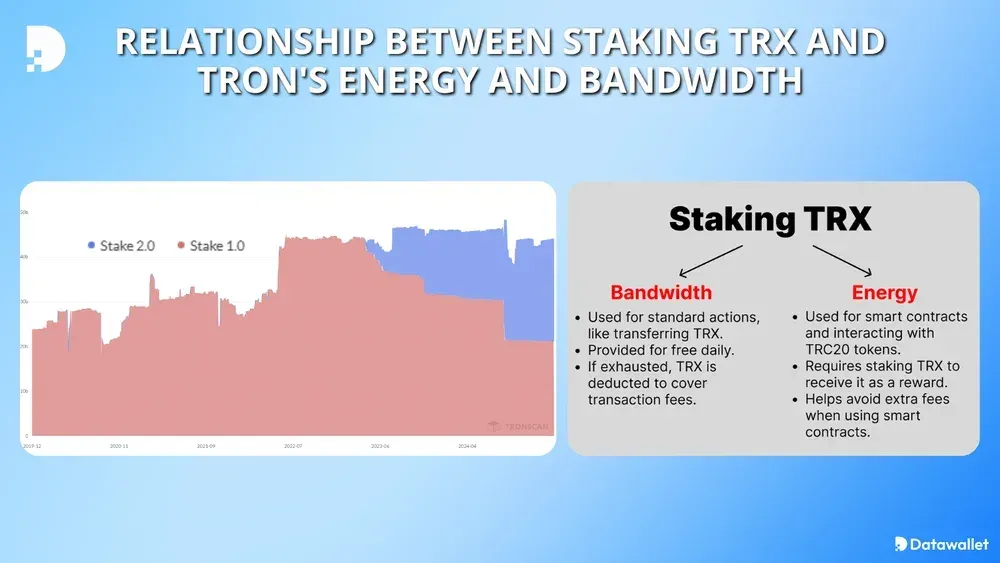
- TRON uses bandwidth (for simple transfers) and energy (for smart-contract calls like USDT).
- Sending USDT to a wallet that has never held USDT costs roughly double the energy.
- You can cover energy by burning TRX, staking TRX, or renting energy from a delegation service.
- In August 2025 TRON governance cut the energy price from 210 SUN to 100 SUN per unit.
- USD figures move with the live TRX price and network conditions — always treat them as estimates.
How do TRON network fees actually work?
Most people assume TRON is always cheap. It usually is — until it isn’t. The confusion comes from treating two very different transaction types as one.
A plain TRX transfer consumes bandwidth points only. Every TRON account receives 600 free bandwidth points refreshed daily, enough for roughly two standard TRX transfers (each costs about 269 points). If that allocation runs out, the network charges 0.001 TRX per point from the sender’s wallet — a near-trivial cost for casual users. You can read the official model in the TRON developer resource-model docs.
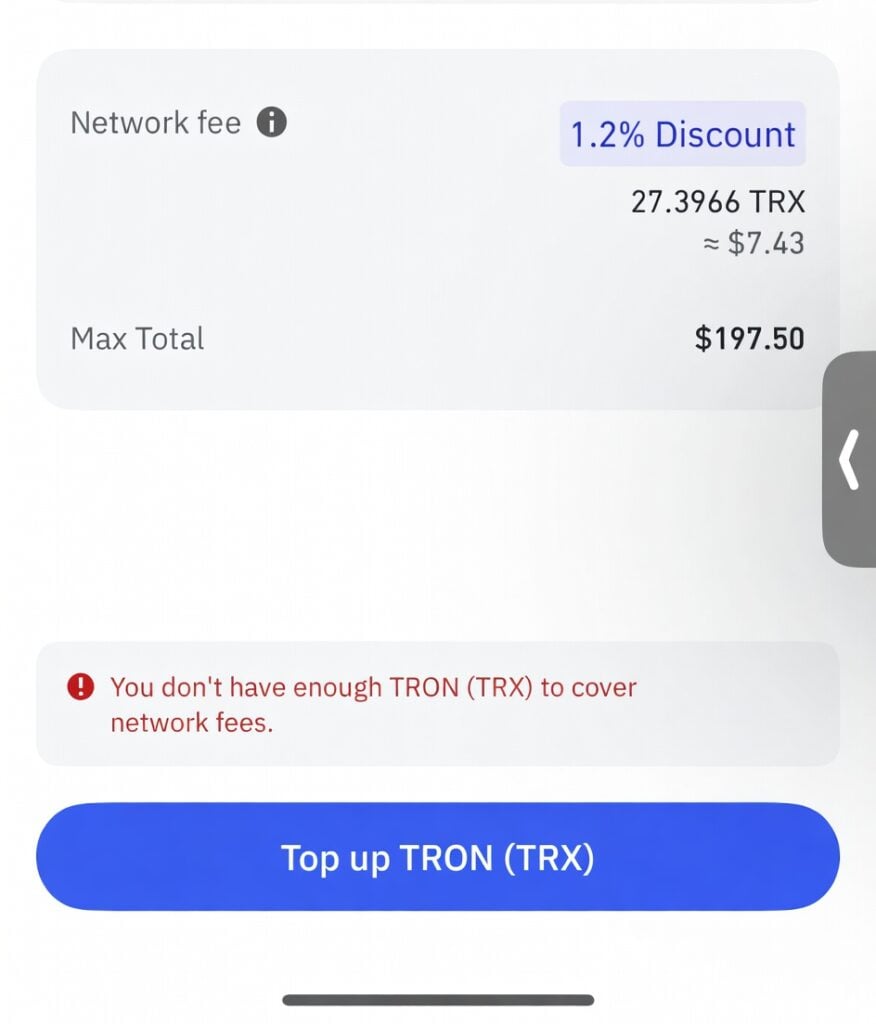
TRC-20 token transfers — most commonly USDT — are different. These are smart-contract calls that consume energy on top of bandwidth. Energy is the resource that surprises most users, because it isn’t free by default and the amounts are substantial.
Here is the breakdown in plain numbers. USD figures are estimates only, shown as of mid-2026 and assuming a TRX price of approximately $0.32; verify the live price on CoinMarketCap and the energy a real transfer used on TronScan, because both TRX price and network parameters change.
| Transaction type | Bandwidth used | Energy used | Estimated fee (TRX) | Estimated fee (USD)* |
|---|---|---|---|---|
| TRX transfer | ~269 points | 0 | ~0.269 TRX | ~$0.09 |
| USDT to existing wallet | ~345 points | ~64,285 units | ~13 TRX | ~$4.16 |
| USDT to new wallet | ~345 points | ~130,000 units | ~27 TRX | ~$8.64 |
*Figures as of mid-2026 assuming TRX ≈ $0.32; verify against a primary source before relying on them.
The “new wallet” row is where the real shock lands: a wallet that has never received USDT requires the network to initialize a token account, which nearly doubles the energy cost. Many complaints about $6 or $7 TRON fees trace back to exactly this scenario.
Why do TRON network fees feel unpredictable?
TRON network fees have a reputation for being cheap, and by blockchain standards they generally are. But “cheap compared to Ethereum” and “cheap in absolute terms” are not the same. A few factors make fees feel inconsistent.
The empty-wallet problem
This is the single biggest gotcha in the TRON ecosystem. Sending USDT to a wallet that has never held USDT costs roughly twice as much as sending to an established one. The extra energy — on the order of 65,000 units — works out to about 13–14 TRX at current parameters, an unexpected few dollars per transfer the first time.
The fix is simple: before sending, check the destination on TronScan to confirm it has USDT history. If it is empty, expect the higher fee — or ask the recipient to receive a tiny USDT amount first to activate the account.
Network congestion and energy price
The cost of energy in SUN (the smallest unit of TRX, where 1 TRX = 1,000,000 SUN) shifts with network demand. In August 2025 the TRON community voted to reduce the energy unit price from 210 SUN to 100 SUN, roughly a 52% cut, which lowered the TRX cost of every USDT transfer paid by burning TRX directly.
During high-congestion periods, open-market rental rates can drift upward. Users who arrange energy in advance tend to pay more predictable fees than those who burn TRX on demand.
TRX price movement
The network always charges fees in TRX, not dollars. If TRX rises in price, the dollar cost of the same TRX-denominated fee rises with it: a 13 TRX fee is about $2.60 at $0.20/TRX and about $4.16 at $0.32/TRX. The network did not get more expensive; TRX got more valuable.
How can you reduce TRON network fees?
The good news is that TRON network fees are unusually controllable. There are three practical approaches, each suited to a different usage pattern, summarized below.
| Approach | Best for | Tradeoff |
|---|---|---|
| Stake (freeze) TRX | High-volume holders | TRX locked ~14 days; needs large stake |
| Rent energy | Occasional or bursty senders | Per-transfer rental fee |
| Burn TRX directly | One-off transfers | Highest per-transfer cost |
Stake TRX for free energy and bandwidth
Freezing TRX through the TRON network (via TronLink or TronScan) generates both energy and bandwidth over time. The more TRX staked, the more resources available. For users who send USDT frequently and hold significant TRX, staking is the most cost-efficient long-term option — once the stake is large enough, transfers can become effectively free.
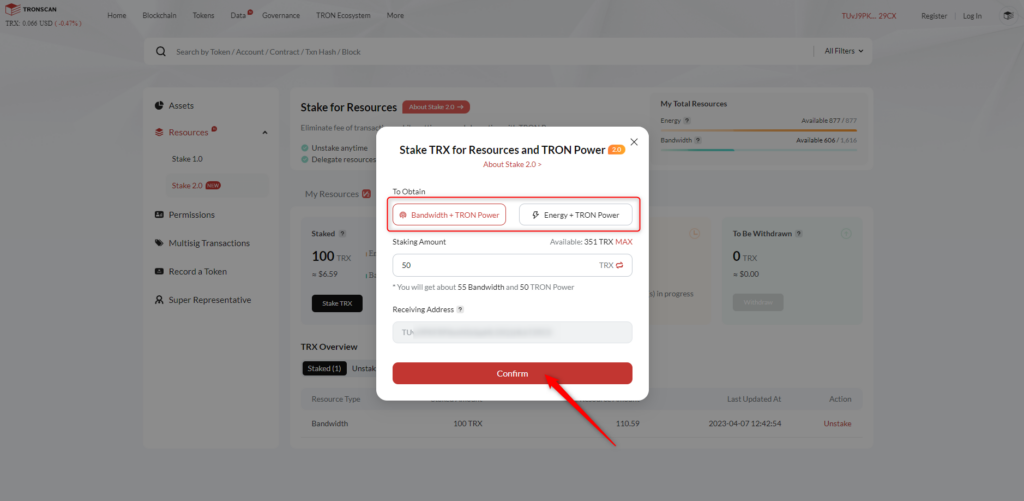
The tradeoff: staked TRX is locked for a minimum period (currently 14 days before it can be unstaked). For someone holding a large TRX position long-term, this is compelling. For someone who needs energy only occasionally, it is overkill.
Rent energy from a delegation service
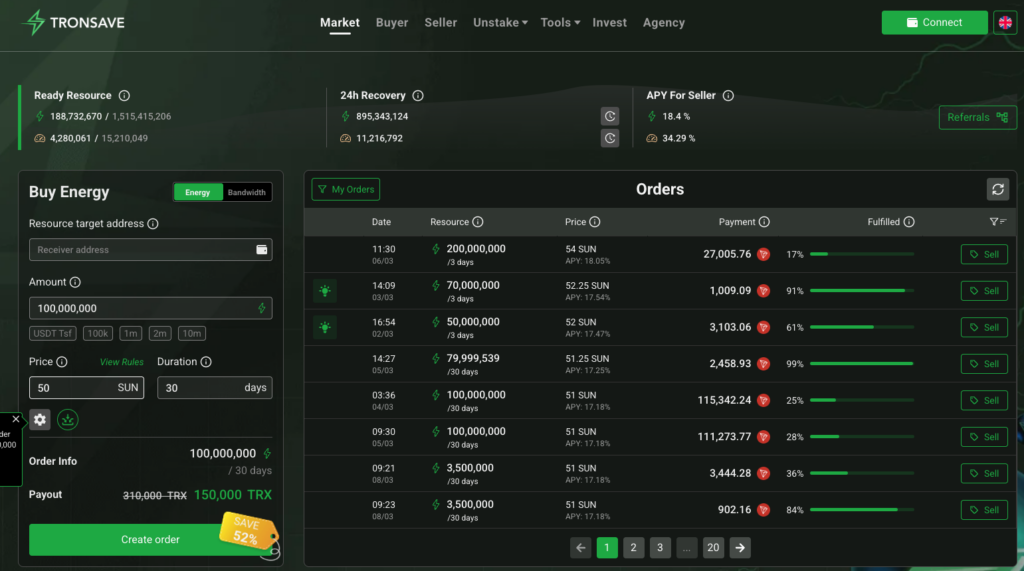
Energy-rental services — TronSave among others — stake large pools of TRX, generate energy, and delegate it to users’ wallets on demand. The user pays a small fee, the energy appears within seconds, and the USDT transfer costs a fraction of the burn-TRX alternative.
At recent market rates, renting energy for a standard USDT transfer has cost roughly 4–5 TRX versus about 13 TRX burned directly — an estimated 60–70% reduction per transfer (varies with TRX price and network conditions; not guaranteed). Compare a few providers and current rates before committing.
Reputable delegation involves no lock-up and no custody of your keys: you enter the wallet address, select the energy amount, and the delegation happens on-chain with a verifiable transaction hash you can confirm on TronScan.
Time transfers and check recipient wallets
Two habits that cost nothing: check whether the destination wallet already holds USDT (avoiding the double-energy penalty), and, for non-urgent transfers, send during lower-traffic periods when rental prices are softer. Together these can materially lower your effective per-transfer cost without staking or renting anything.
How do TRON fees compare with other networks?
For context, here is how typical USDT transfer costs compare across major chains. Treat ranges as rough estimates that shift with market conditions:
| Blockchain | USDT transfer fee (typical) | Settlement speed | Notes |
|---|---|---|---|
| TRON (TRC-20) | $0.50–$4 | ~3 seconds | Reducible with energy rental |
| Ethereum (ERC-20) | $5–$50+ | 15 seconds–5 minutes | Spikes during congestion |
| Polygon | $0.01–$0.50 | ~2 seconds | Lower USDT liquidity |
| BNB Chain (BEP-20) | $0.10–$1 | ~3 seconds | Centralized validation |
| Solana | <$0.01 | <1 second | Growing USDT ecosystem |
TRON holds a strong middle ground: faster and cheaper than Ethereum, with deeper USDT liquidity than Polygon or Solana, and its fees stay manageable with the right tools.
Frequently asked questions
Why did my TRON USDT transfer cost $7? Most likely the recipient wallet had never received USDT before. New addresses require roughly double the energy (~130,000 units vs. ~64,285) because the network initializes a token account. Check TronScan before sending to unfamiliar addresses.
Do I always need TRX to pay fees? Not if you have pre-loaded energy and bandwidth from staking or delegation. When those resources cover the transaction, no TRX is deducted. When they are absent, TRX is burned automatically from the sending wallet.
What is SUN, and how does it relate to TRON fees? SUN is the smallest denomination of TRX — 1 TRX equals 1,000,000 SUN. Energy prices are quoted in SUN per unit (about 100 SUN after the 2025 reduction). It is a unit of account, not a separate token.
Is energy rental safe? It can be, with reputable providers. Delegation happens on-chain — the provider never touches your private keys — and each delegation has a verifiable transaction hash on TronScan. Still, do your own research before choosing a service.
Will staking TRX make my transfers completely free? For users doing a handful of USDT transfers per day, staking enough TRX can generate sufficient energy to effectively eliminate fees. The exact amount depends on your transfer count and the current energy-per-TRX generation rate.
Did TRON lower its fees recently? Yes. In August 2025, a community governance vote reduced the energy price from 210 SUN to 100 SUN per unit, cutting the base cost of TRC-20 transfers by roughly half.
Conclusion
Understanding TRON network fees changes the whole experience of using the network. The gap between a $7 transfer and a $1.50 transfer is not luck — it is knowing that TRC-20 USDT consumes energy, that new wallet addresses cost double, and that staking or renting energy can cut costs substantially per transfer (amounts vary; not guaranteed).
Pick one action today: check a recipient’s wallet on TronScan before your next USDT send, or compare staking against an energy-rental service such as TronSave. Either habit will save real money over time.
⚠️ Not financial advice. This article is for educational and informational purposes only and reflects the author’s opinion at the time of writing. It is not investment, financial, legal, or tax advice. Cryptocurrency is highly volatile and you can lose your entire principal; prices, APYs, and on-chain fees change constantly and may be out of date. Always do your own research (DYOR) and consult a licensed financial advisor before buying, selling, staking, or lending any digital asset.
Disclosure: This is the official TronSave blog. TronSave sells TRON energy/resource (fee-reduction) services and has a commercial interest in the products and topics covered here.



