
To buy USDT TRON (USDT TRC20), pick a swap or exchange platform such as ChangeNOW, SimpleSwap, or Coinbase, fund it with a card, PayPal, or bank transfer, paste your TRON wallet address, and confirm. USDT usually arrives within minutes on the TRON network, which charges lower fees than Ethereum.
Key Takeaways
- USDT TRC20 on TRON settles in seconds and typically costs far less than Ethereum’s ERC20 gas (often $5–$20 per transfer).
- On-chain fees range from roughly $3.63–$7.37 without energy, dropping to about $0.42–$1.15 when you use an energy-rental service (figures vary with TRON energy prices; verify before relying on them).
- You can buy USDT TRON with a credit/debit card, PayPal, Apple Pay, or bank transfer; some swaps skip KYC for small amounts (thresholds vary by provider and change often).
- Compare platforms like ChangeNOW, SimpleSwap, Changelly, MoonPay, and Coinbase on fees, KYC, and supported networks.
- Store USDT in a TRC20-compatible wallet (Trust Wallet, Bitget) and consider a hardware wallet for long-term holdings.
What Is USDT TRON (TRC20)?
USDT TRC20 is Tether’s US-dollar stablecoin issued on the TRON blockchain. It is designed to hold a 1:1 peg to the US dollar, so it aims to avoid the sharp price swings of assets like Bitcoin. The “TRC20” label simply means the token follows TRON’s token standard, the same way “ERC20” refers to Ethereum’s standard.
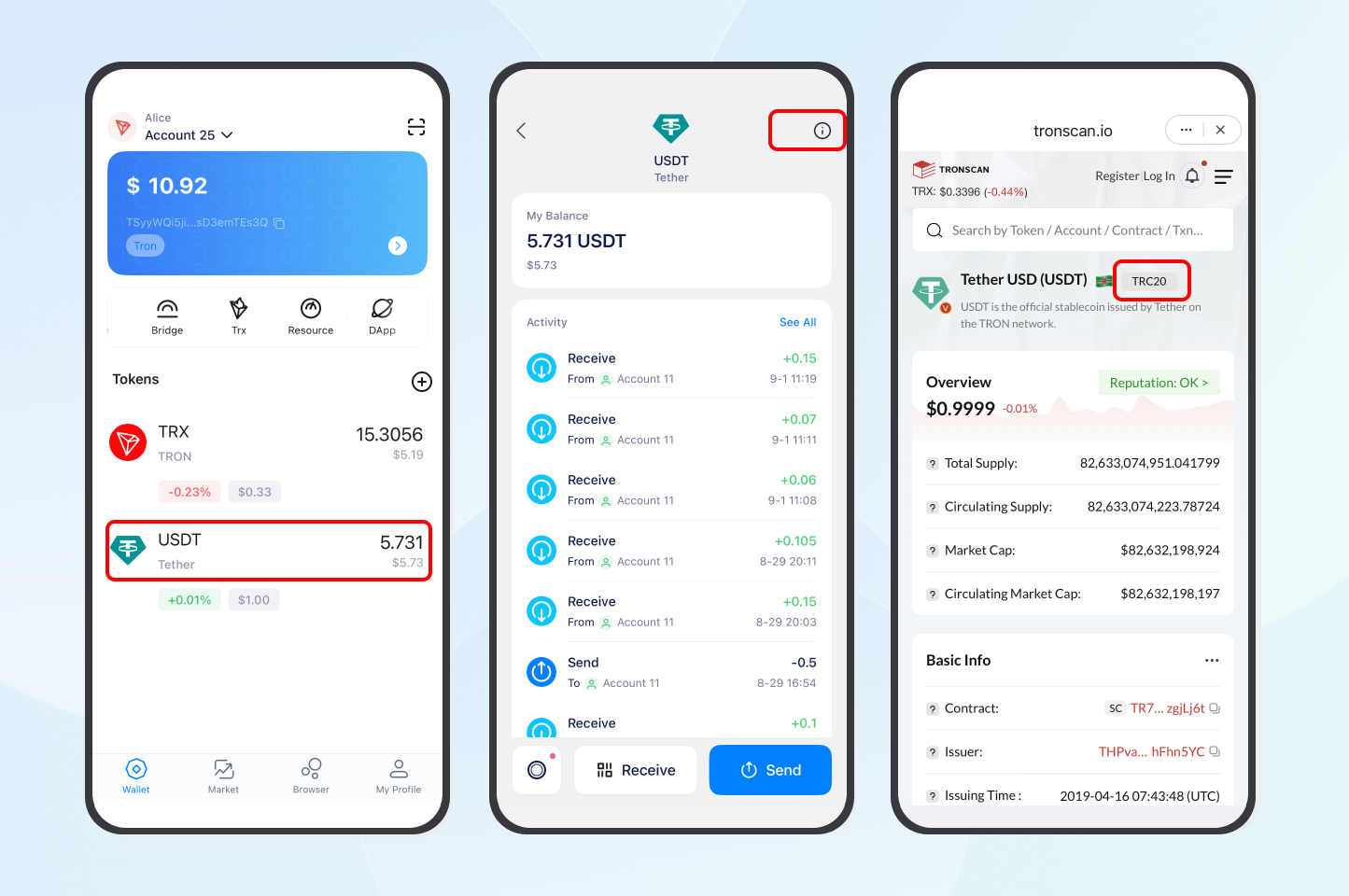
TRON has become one of the most widely used networks for USDT. According to Tether’s transparency page, large volumes of USDT circulate on TRON, and you can confirm any token contract or balance on TronScan. Because settlement is fast and inexpensive, many people choose to buy USDT TRON for remittances, trading, and everyday transfers.
Why Choose USDT TRC20 on TRON?
Pegged to the US dollar, USDT TRC20 helps you sidestep crypto volatility while keeping funds on-chain. TRON stands out for a few practical reasons:
- Lower fees: Standard transfers run about $3.63–$7.37, but energy-rental services can cut that to roughly $0.42–$1.15 — well below Ethereum’s typical $5–$20.
- Fast settlement: TRON’s often-cited capacity of around 2,000 transactions per second is a theoretical figure (real-world throughput is lower), yet it still clears transfers in seconds.
- DeFi access: Lend on JustLend or trade on SunSwap (yields vary and are never guaranteed).
- Global payments: Spend USDT TRC20 through merchant gateways such as BitPay.
- Broad adoption: TRON consistently ranks among the top networks for USDT supply; check live figures on CoinMarketCap.
How Do You Buy USDT TRON Step by Step?
Buying USDT TRC20 is straightforward once you have a platform and a wallet ready. Here is a clear five-step process.
Step 1: Choose a Platform
- ChangeNOW: roughly 0.5–1% spread, card/Apple Pay/Google Pay support, limited KYC for small buys.
- SimpleSwap: around 0.6–1.2%, with a built-in price calculator.
- Changelly: about 0.5–1.5%, low minimums.
- MoonPay / Coinbase: regulated, KYC required, beginner-friendly fiat on-ramps.
Always compare the all-in rate, since the quoted spread does not always include network fees.
Step 2: Set Up a TRON Wallet
You need a TRC20-compatible wallet to receive USDT:
- Trust Wallet: mobile-friendly and TRC20-ready in minutes.
- Bitget Wallet: good DApp and DeFi access.
- NOW Wallet: non-custodial and simple.
Create the wallet, copy your TRC20 receiving address, and keep a small amount of TRX on hand for fees. Triple-check the address before sending — on-chain mistakes are usually irreversible.
Step 3: Select a Payment Method
- Card: fastest, widely accepted.
- PayPal: available on some on-ramps (often 1–2%).
- Apple Pay / Google Pay: instant on supported platforms.
- Bank transfer: cheaper for large amounts but slower (1–2 days).
Step 4: Complete the Purchase
Using a swap such as ChangeNOW as an example: choose your fiat currency and amount, select USDT TRC20 as the receiving coin, paste your TRON wallet address, enter payment details, and confirm. USDT typically arrives within a few minutes.
Step 5: Secure Your USDT
- Use a hardware wallet (Ledger, Trezor) for long-term storage.
- Enable two-factor authentication on accounts and apps.
- Only use official links to avoid phishing.
Which Platforms Are Best to Buy USDT TRC20?
Fees, KYC rules, and limits change frequently, so treat this table as a starting point and confirm current terms on each provider’s site.
| Platform | Approx. Fees | KYC | Payment Methods | Typical Speed |
| ChangeNOW | 0.5–1% | Limited for small buys | Card, Apple Pay, Google Pay, bank | ~4 min |
| SimpleSwap | 0.6–1.2% | Limited | Card, Apple Pay, Google Pay, bank | ~5 min |
| Changelly | 0.5–1.5% | Limited for small buys | Card, bank | ~5 min |
| MoonPay | 1–2% | Required | Card, PayPal, Apple/Google Pay | ~10 min |
| Coinbase | 1.5–3% | Required | Card, bank | ~10 min |
How Do You Manage and Lower TRON Fees?
TRON fees for USDT TRC20 are usually higher than the often-quoted “$0.01,” because they depend on energy and bandwidth costs that move with network demand.
- Standard fees: roughly $3.63 (active wallet) to $7.37 (new/empty wallet) — verify current figures, as they vary with TRON energy prices.
- Lower them with energy: energy-rental services such as TronSave can reduce a transfer to about $0.42–$1.15.
- Or stake TRX: staking a larger amount of TRX (with a lockup period) can earn enough energy for near-zero fees, though it locks up capital.
For a deeper walkthrough, see our guide on reducing TRON gas fees and our overview of what TRON energy is. Energy rental, staking, and exchange withdrawals are all valid ways to move USDT — choose what fits your volume.
What Are the Risks of Buying USDT TRON?
Stablecoins are not risk-free. Keep these caveats in mind:
- Peg and reserve risk: USDT aims to hold its dollar peg, but it has briefly traded off-peg in the past, and Tether’s reserve composition has drawn scrutiny. Review Tether’s transparency reports yourself.
- Regulatory and tax risk: No-KYC buying may not be permitted in your jurisdiction, and crypto gains may be taxable. Comply with local law.
- Counterparty risk: swaps and on-ramps vary in reliability; stick to established, encrypted platforms.
- User error: sending to a wrong or non-TRC20 address can permanently lose funds.
FAQ: Buying USDT TRON
What is the best TRON wallet for USDT TRC20?
Trust Wallet and Bitget Wallet are popular for ease of use and DeFi access. For larger balances, a hardware wallet adds protection.
Can I buy USDT TRON without KYC?
Some swaps allow small purchases with limited verification, but thresholds change frequently and vary by region. Always confirm current limits and whether no-KYC buying is legal where you live.
What are typical USDT TRC20 fees?
Roughly $3.63–$7.37 without energy, or about $0.42–$1.15 with an energy-rental service. Fees move with TRON energy prices, so verify before sending.
How fast does USDT TRON arrive?
On-chain transfers usually confirm in seconds; buying through a fiat on-ramp typically takes a few minutes once payment clears.
Can I use USDT TRC20 in DeFi?
Yes — you can lend on JustLend or trade on SunSwap, though yields vary and are not guaranteed.
Are there tax implications?
Possibly. In many countries crypto transactions are reportable. Check local rules or consult a tax professional.
Conclusion
USDT TRC20 on TRON offers fast, low-cost stablecoin transfers, making it a practical choice for trading, DeFi, and global payments. To buy USDT TRON, choose a reputable platform, set up a secure TRC20 wallet, and manage fees with energy rental or staking. Compare options, verify current fees and limits against primary sources, and keep the risks in mind before you transact.
⚠️ Not financial advice. This article is for educational and informational purposes only and reflects the author’s opinion at the time of writing. It is not investment, financial, legal, or tax advice. Cryptocurrency is highly volatile and you can lose your entire principal; prices, APYs, and on-chain fees change constantly and may be out of date. Always do your own research (DYOR) and consult a licensed financial advisor before buying, selling, staking, or lending any digital asset.
Disclosure: This is the official TronSave blog. TronSave sells TRON energy/resource (fee-reduction) services and has a commercial interest in the products and topics covered here.



